

When Can Foreign Keys Affect Performance?
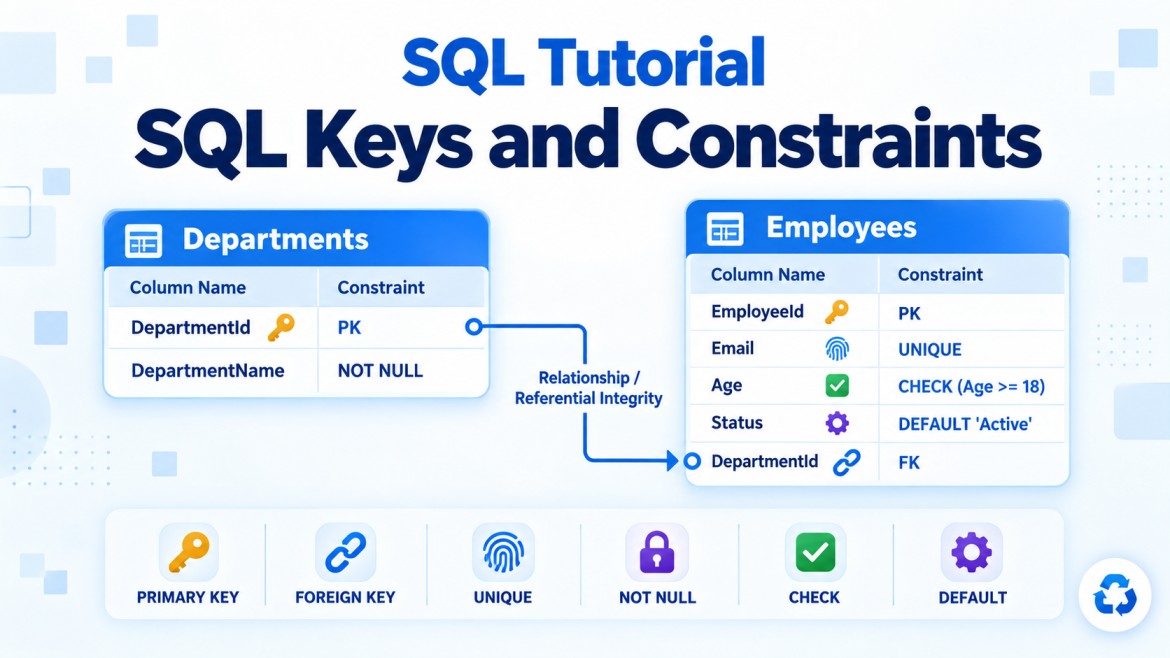
A foreign key maintains referential integrity by ensuring that a child value refers to an existing parent value.
Example:
Departments (Parent)
    DepartmentId — Primary Key
          ↑
Employees (Child)
    DepartmentId — Foreign Key
CREATE TABLE Departments
(
DepartmentId INT PRIMARY KEY,
DepartmentName VARCHAR(100) NOT NULL
);
CREATE TABLE Employees
(
EmployeeId INT PRIMARY KEY,
EmployeeName VARCHAR(100) NOT NULL,
DepartmentId INT NOT NULL,
CONSTRAINT FK_Employees_Departments
FOREIGN KEY (DepartmentId)
REFERENCES Departments(DepartmentId)
);Foreign keys provide essential data integrity, but they add validation work during certain data-modification operations.
Quick Answer
Foreign keys can affect performance during:
-
Inserting child records
-
Updating foreign-key values
-
Updating referenced parent keys
-
Deleting parent records
-
Cascading updates and deletes
-
Bulk data imports
-
High-concurrency transactions
-
Operations involving unindexed foreign-key columns
-
Long chains of related tables
Foreign keys normally have little direct negative impact on ordinary SELECT queries.
1. Inserting Rows into the Child Table
When a child record is inserted, SQL Server must verify that the referenced parent exists.
INSERT INTO Employees
(
    EmployeeId,
    EmployeeName,
    DepartmentId
)
VALUES
(
    1,
    'Arun',
    10
);
Before completing the insert, SQL Server checks:
Does DepartmentId 10 exist in Departments?Conceptually, it performs a lookup similar to:
SELECT DepartmentId
FROM Departments
WHERE DepartmentId = 10;
If the parent exists, the insert succeeds. Otherwise, it fails.
Performance effect
Every inserted child row requires referential-integrity validation.
For one row, the overhead is usually very small. For millions of rows, the cumulative validation cost can become noticeable.
Why is the lookup usually fast?
The referenced parent columns must be protected by a primary key, unique constraint or suitable unique index. Therefore, SQL Server normally has an index available to locate the parent efficiently.
2. Updating the Foreign Key in the Child Table
When a child foreign-key value changes, SQL Server must verify the new parent value.
UPDATE Employees
SET DepartmentId = 20
WHERE EmployeeId = 1;
SQL Server checks whether department 20 exists.
If it does not exist, the update fails.
Performance effect
Updating many child rows can require many parent-key checks:
UPDATE Employees
SET DepartmentId = 20
WHERE DepartmentId = 10;
The cost increases when:
-
Many child rows are updated.
-
The transaction is large.
-
Several foreign keys exist on the table.
-
Concurrent transactions are using the parent table.
3. Deleting a Parent Row
When a parent row is deleted, SQL Server must check whether child rows reference it.
DELETE FROM Departments
WHERE DepartmentId = 10;
With the default NO ACTION behavior, SQL Server must determine:
Does any employee still reference department 10?Conceptually:
SELECT 1
FROM Employees
WHERE DepartmentId = 10;
If related employees exist, the deletion is rejected.
Why can this become slow?
If Employees.DepartmentId is not indexed, SQL Server may scan the entire Employees table to find matching rows.
For a table containing millions of employees, this can be expensive.
CREATE INDEX IX_Employees_DepartmentId
ON Employees(DepartmentId);
After creating this index, SQL Server can seek directly to employees belonging to department 10.
4. Updating a Referenced Parent Key
If a referenced parent key is updated, SQL Server must ensure that the change does not leave invalid child records.
UPDATE Departments
SET DepartmentId = 20
WHERE DepartmentId = 10;
With ON UPDATE NO ACTION, SQL Server searches for child rows referencing department 10.
If any exist, the update fails.
With ON UPDATE CASCADE, SQL Server must update every related child row.
FOREIGN KEY (DepartmentId)
REFERENCES Departments(DepartmentId)
ON UPDATE CASCADE
Performance effect
Updating a parent key can be expensive when:
-
Many child rows reference the parent.
-
Several tables reference the same parent.
-
Foreign-key columns are not indexed.
-
Cascading update is enabled.
-
The change produces a large transaction.
This is one reason primary-key values should normally remain stable.
5. Missing Index on the Foreign-Key Column
This is one of the most common foreign-key performance problems.
Important point
SQL Server automatically creates an index for:
-
Primary-key constraints
-
Unique constraints
But it does not automatically create an index on a child foreign-key column.
CONSTRAINT FK_Employees_Departments
    FOREIGN KEY (DepartmentId)
    REFERENCES Departments(DepartmentId)
This does not automatically create:
CREATE INDEX IX_Employees_DepartmentId
ON Employees(DepartmentId);
Operations affected by a missing foreign-key index
A missing child-side index can slow down:
-
Parent-row deletions
-
Parent-key updates
-
Joins between parent and child
-
Searches using the foreign-key column
-
Cascading deletes
-
Cascading updates
-
Referential-integrity checks
Example query
SELECT
    e.EmployeeId,
    e.EmployeeName,
    d.DepartmentName
FROM Employees AS e
INNER JOIN Departments AS d
    ON d.DepartmentId = e.DepartmentId
WHERE d.DepartmentId = 10;
An index on Employees.DepartmentId can help SQL Server locate the matching employees efficiently.
CREATE INDEX IX_Employees_DepartmentId
ON Employees(DepartmentId);
Composite foreign key
For a composite foreign key:
FOREIGN KEY (CompanyId, BranchId)
REFERENCES Branches(CompanyId, BranchId)
A corresponding child index is often useful:
CREATE INDEX IX_Employees_CompanyId_BranchId
ON Employees(CompanyId, BranchId);
Column order matters. The index should normally begin with the foreign-key columns in a useful order for the workload.
6. Cascading Delete
With ON DELETE CASCADE, deleting one parent can automatically delete many children.
CREATE TABLE OrderItems
(
    OrderItemId INT PRIMARY KEY,
    OrderId INT NOT NULL,

    CONSTRAINT FK_OrderItems_Orders
        FOREIGN KEY (OrderId)
        REFERENCES Orders(OrderId)
        ON DELETE CASCADE
);
Deleting one order:
DELETE FROM Orders
WHERE OrderId = 101;
may delete thousands of order items.
Performance effects
A large cascading delete can produce:
-
High CPU and I/O activity
-
Many transaction-log records
-
Longer-running transactions
-
More locks
-
Blocking of other sessions
-
Index-maintenance overhead
-
Possible lock escalation
-
Increased rollback time if the operation fails
If cascades continue through multiple levels, the work can grow significantly:
Customer
  └── Orders
       └── OrderItems
            └── ItemAuditRecords
7. Cascading Update
With ON UPDATE CASCADE, updating the parent key changes all matching child foreign keys.
UPDATE Departments
SET DepartmentId = 20
WHERE DepartmentId = 10;
If 500,000 employees reference department 10, SQL Server may need to update 500,000 child rows.
Each update may also require:
-
Transaction-log entries
-
Index updates
-
Page modifications
-
Locks
-
Trigger execution, if triggers exist
-
Further cascades to additional tables
This is why stable surrogate keys are preferred:
DepartmentId INT IDENTITY PRIMARY KEYThe department’s business code can change without modifying the key:
UPDATE Departments
SET DepartmentCode = 'TECH'
WHERE DepartmentId = 10;
8. Bulk Inserts and Data Imports
During bulk import, every inserted child row must satisfy the foreign-key constraint.
BULK INSERT Employees
FROM 'employees.csv';
For millions of rows, referential checks add work.
Factors affecting import performance
-
Number of inserted rows
-
Number of foreign keys on the table
-
Parent-index efficiency
-
Transaction size
-
Existing indexes on the child table
-
Invalid or duplicated source data
-
Available memory, CPU and I/O capacity
Should foreign keys be disabled?
Foreign keys can technically be disabled before a controlled load:
ALTER TABLE Employees
NOCHECK CONSTRAINT FK_Employees_Departments;
But this introduces a major risk: invalid child records may be inserted.
After loading, re-enable and validate the constraint:
ALTER TABLE Employees
WITH CHECK CHECK CONSTRAINT FK_Employees_Departments;
The two CHECK keywords have distinct purposes:
-
WITH CHECKvalidates existing rows. -
CHECK CONSTRAINTenables the constraint for future changes.
Do not re-enable it only with:
ALTER TABLE Employees
CHECK CONSTRAINT FK_Employees_Departments;
That may leave it untrusted because existing data was not validated.
9. Untrusted Foreign Keys
A foreign key becomes untrusted when SQL Server cannot guarantee that all existing rows satisfy it.
You can check the status using:
SELECT
    name,
    is_disabled,
    is_not_trusted
FROM sys.foreign_keys;
When:
is_not_trusted = 1SQL Server knows the constraint exists but cannot assume all existing data follows it.
Why does this matter?
The optimizer may not use an untrusted foreign key for query simplifications and optimizations.
Restore trust using:
ALTER TABLE Employees
WITH CHECK CHECK CONSTRAINT FK_Employees_Departments;
This scans and validates existing data, so it can be expensive on a large table—but it restores integrity and optimizer trust.
10. High-Concurrency Transactions
Foreign-key validation can contribute to locking and blocking.
Consider two transactions:
Transaction 1
BEGIN TRANSACTION;

DELETE FROM Departments
WHERE DepartmentId = 10;
Transaction 2
INSERT INTO Employees
(
    EmployeeId,
    EmployeeName,
    DepartmentId
)
VALUES
(
    100,
    'Arun',
    10
);
SQL Server must coordinate these operations:
-
Transaction 1 is deleting the parent.
-
Transaction 2 is trying to create a new child referencing that parent.
Appropriate locks are required to prevent inconsistent data.
Possible effects
-
One transaction may wait.
-
Blocking chains may form.
-
Deadlocks may occur in complex workloads.
-
Large cascades may hold locks for a long time.
-
Lock escalation may occur.
An index on the child foreign-key column can reduce the time required to locate related rows, which can shorten lock duration.
11. Many Foreign Keys on One Table
A table may contain several foreign keys:
CREATE TABLE Orders
(
    OrderId INT PRIMARY KEY,
    CustomerId INT NOT NULL,
    ProductId INT NOT NULL,
    SalesPersonId INT NOT NULL,
    ShippingAddressId INT NOT NULL,
    PaymentMethodId INT NOT NULL
);
During every insert, SQL Server may need to validate:
-
Customer
-
Product
-
Salesperson
-
Shipping address
-
Payment method
Each check is normally efficient, but the total cost can become noticeable during very high-volume writes.
Important consideration
Do not remove necessary foreign keys merely to gain small performance improvements. Data corruption and orphaned records are usually much more expensive than validation overhead.
12. Foreign Keys and SELECT Performance
Foreign keys do not normally slow down simple SELECT queries because they are not revalidated every time data is read.
In some cases, trusted foreign keys can actually help query optimization.
For example, the optimizer knows:
Every Employees.DepartmentId refers to a valid Departments.DepartmentId.This information may allow certain query transformations, including join elimination in eligible cases.
Therefore, a foreign key can provide both:
-
Data-integrity benefits
-
Optimizer information
The child-side index—not the foreign-key constraint by itself—is what commonly improves joins and filters.
Example: Performance Without and With an Index
Suppose Employees contains ten million rows.
DELETE FROM Departments
WHERE DepartmentId = 10;
Before deleting, SQL Server must find employees referencing department 10.
Without an index
Scan a large part or all of Employees
→ Find matching DepartmentId values
→ Block or allow the delete
With an index
CREATE INDEX IX_Employees_DepartmentId
ON Employees(DepartmentId);
Seek directly to DepartmentId 10
→ Find matching rows quickly
→ Block or allow the deleteThe foreign key did not change. The supporting index made its validation more efficient.
Should Every Foreign Key Be Indexed?
Not automatically. It depends on how the table is used.
An index is usually beneficial when:
-
The child table is large.
-
The parent is frequently deleted or its key updated.
-
Tables are frequently joined using the foreign key.
-
Queries frequently filter using the foreign key.
-
Cascading actions are configured.
-
Each parent has many child rows.
An index may not be necessary when:
-
The child table is very small.
-
The foreign-key column has little query usage.
-
The table is write-heavy and rarely read by that relationship.
-
Another composite index already begins with the foreign-key column.
-
The cost of index maintenance exceeds its benefit.
Example: This index may already support the foreign key:
CREATE INDEX IX_Employees_DepartmentId_Status
ON Employees(DepartmentId, EmploymentStatus);
A separate index on only DepartmentId might be redundant.
Indexing Trade-Off
Adding an index can improve:
-
Foreign-key checks
-
Parent deletes
-
Parent-key updates
-
Joins
-
Filtering
But every additional index increases the cost of:
-
INSERT -
UPDATE -
DELETE -
Storage
-
Index maintenance
-
Transaction logging
Therefore, confirm the need using:
-
Actual execution plans
-
Query Store
-
Runtime statistics
-
Index-usage information
-
Blocking and wait analysis
Finding Foreign Keys Without Supporting Indexes
This simplified query helps inspect foreign-key columns and indexes, although composite keys require more detailed analysis:
SELECT
    fk.name AS ForeignKeyName,
    OBJECT_NAME(fk.parent_object_id) AS ChildTable,
    c.name AS ForeignKeyColumn
FROM sys.foreign_keys AS fk
INNER JOIN sys.foreign_key_columns AS fkc
    ON fkc.constraint_object_id = fk.object_id
INNER JOIN sys.columns AS c
    ON c.object_id = fkc.parent_object_id
   AND c.column_id = fkc.parent_column_id
ORDER BY ChildTable, ForeignKeyName;
After identifying the foreign-key columns, inspect existing indexes before creating new ones.
EXEC sp_helpindex 'dbo.Employees';Do not create indexes blindly; an appropriate composite index may already cover the relationship.
Performance Improvement Guidelines
1. Index frequently used foreign keys
CREATE INDEX IX_OrderItems_OrderId
ON OrderItems(OrderId);
2. Keep transactions small
Avoid deleting or updating millions of related rows in one long transaction when controlled batching is possible.
3. Use stable primary keys
Prefer keys that do not change:
DepartmentId INT IDENTITY PRIMARY KEY4. Use cascading actions carefully
Understand the total number of affected rows before enabling or executing cascades.
5. Validate bulk-loaded data
If constraints are temporarily disabled, re-enable them using:
WITH CHECK CHECK CONSTRAINT6. Keep foreign keys trusted
Check:
SELECT name, is_not_trusted
FROM sys.foreign_keys
WHERE is_not_trusted = 1;
7. Monitor execution plans and blocking
Do not assume the foreign key itself is the problem. The cause may instead be:
-
Missing indexes
-
Large transactions
-
Poor query design
-
Cascading operations
-
Triggers
-
Index fragmentation
-
Concurrency
-
Incorrect statistics
Advantages vs Performance Cost
| Foreign-key benefit | Possible cost |
|---|---|
| Prevents orphan records | Parent existence checks during child inserts |
| Enforces relationships | Child checks during parent deletes |
| Protects data integrity | Additional work during updates |
| Supports optimizer knowledge | Validation cost during bulk imports |
| Allows cascading actions | Large cascades can generate heavy I/O and logging |
| Centralizes relationship rules | Can contribute to blocking under heavy concurrency |
Key Points
-
Foreign keys mainly affect write operations, not normal read operations.
-
Child inserts require a parent-row existence check.
-
Child foreign-key updates require validation of the new parent.
-
Parent deletes and key updates require searches for related children.
-
SQL Server does not automatically index child foreign-key columns.
-
Missing child-side indexes can make parent deletes and updates expensive.
-
Cascading operations may affect large numbers of rows.
-
Large cascades increase locking, logging, blocking and rollback costs.
-
Numerous foreign keys add validation work to high-volume writes.
-
Bulk imports can slow down because every relationship must be validated.
-
Disabled or untrusted foreign keys reduce integrity and may limit optimizer benefits.
-
Foreign keys can sometimes help query optimization when they are trusted.
-
Do not remove foreign keys only for minor performance gains.
-
Use execution plans and workload evidence before adding or removing indexes.
Interview Answer
Foreign keys mainly affect performance during inserts, updates and deletes because SQL Server must validate parent-child relationships. Child inserts and foreign-key updates require parent existence checks, while parent deletes and key updates require SQL Server to search for referencing child rows. The biggest problem usually occurs when the child foreign-key column is not indexed, causing scans of large child tables. Cascading deletes or updates can also generate extensive locking, logging and I/O. However, foreign keys normally have little direct impact on
SELECTqueries and trusted foreign keys can even help the optimizer. The correct solution is usually appropriate indexing and transaction design—not removing referential integrity.