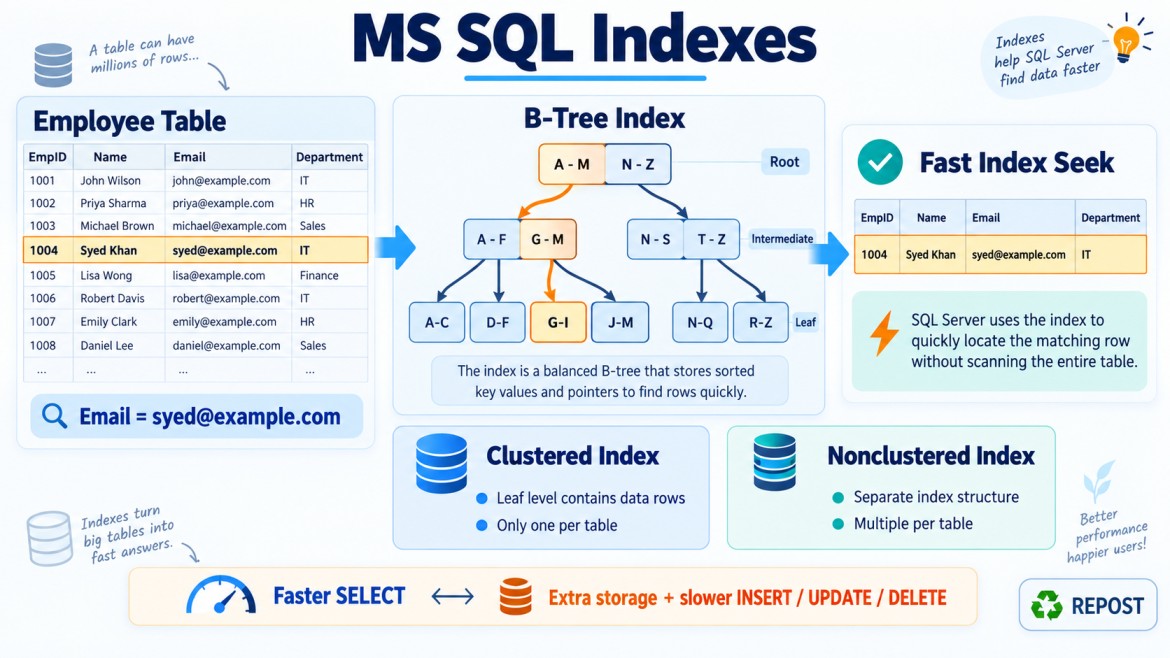


Why Might SQL Server Ignore an Available Index?
SQL Server may ignore an available index when the Query Optimizer estimates that another execution plan will be cheaper.
An index existing on a column does not guarantee that SQL Server will use it. The optimizer compares possible plans based on estimated:
-
CPU usage
-
Logical reads
-
I/O cost
-
Number of matching rows
-
Lookup operations
-
Memory requirements
It may choose an Index Scan, Clustered Index Scan, or Table Scan instead of an Index Seek.
Simple Example
Assume an index exists on DepartmentId:
CREATE INDEX IX_Employees_DepartmentId
ON Employees(DepartmentId);
Query:
SELECT *
FROM Employees
WHERE DepartmentId = 10;
SQL Server may still scan the table if department 10 contains most employees. Using the index could require thousands of Key Lookups, making a scan cheaper.
Common Reasons
1. Query Returns a Large Percentage of Rows
Suppose the table contains one million employees, and 900,000 are active:
SELECT *
FROM Employees
WHERE IsActive = 1;
Even if an index exists on IsActive, SQL Server may prefer a scan because:
-
Most rows must be returned.
-
Many data pages must be accessed anyway.
-
Using the index may cause many Key Lookups.
CREATE INDEX IX_Employees_IsActive
ON Employees(IsActive);
This index has low selectivity because it contains only two possible values:
0 – Inactive
1 – Active
An index is usually more useful when the condition returns a relatively small number of rows.
2. The Table Is Small
For a small table, reading all rows may be faster than navigating through an index.
SELECT *
FROM Countries
WHERE CountryCode = 'IN';
If Countries contains only a few hundred rows, SQL Server may choose a scan even when CountryCode is indexed.
This is not necessarily a performance problem.
3. The Query Is Non-SARGable
A SARGable condition allows SQL Server to efficiently search an index.
Applying a function or calculation to an indexed column can make the condition non-SARGable.
Non-SARGable
SELECT *
FROM Employees
WHERE YEAR(HireDate) = 2026;
Even if HireDate is indexed, SQL Server may calculate YEAR() for many rows.
SARGable version
SELECT *
FROM Employees
WHERE HireDate >= '2026-01-01'
  AND HireDate <  '2027-01-01';
This allows SQL Server to seek directly to the required date range.
Other non-SARGable examples include:
WHERE UPPER(EmployeeName) = 'SYED';WHERE Salary + 1000 > 50000;WHERE ISNULL(DepartmentId, 0) = 10;Rewrite conditions so the indexed column is not unnecessarily wrapped in a function or calculation.
4. A Leading Wildcard Is Used
Consider an index on EmployeeName:
CREATE INDEX IX_Employees_EmployeeName
ON Employees(EmployeeName);
This query can potentially use an Index Seek:
SELECT *
FROM Employees
WHERE EmployeeName LIKE 'Sye%';
SQL Server knows where values beginning with Sye are located.
This query generally cannot use a normal B-tree index for an efficient seek:
SELECT *
FROM Employees
WHERE EmployeeName LIKE '%Syed%';
Because the value can contain Syed anywhere, SQL Server may scan the index or table.
For advanced text searching, consider SQL Server Full-Text Search.
5. Implicit Data-Type Conversion
If the query value and column have different data types, SQL Server may perform an implicit conversion.
Assume EmployeeCode is VARCHAR:
CREATE INDEX IX_Employees_EmployeeCode
ON Employees(EmployeeCode);
Problematic query:
SELECT *
FROM Employees
WHERE EmployeeCode = 1001;
SQL Server may convert the column values from VARCHAR to INT, which can prevent an efficient seek.
Correct query:
SELECT *
FROM Employees
WHERE EmployeeCode = '1001';
Common conversion problems include:
-
VARCHARcompared withNVARCHAR -
Character column compared with a number
-
DATEcompared with an incompatible string -
INTcompared with a different numeric type
The parameter type should match the column type.
6. The Leading Column of a Composite Index Is Missing
Suppose the following index exists:
CREATE INDEX IX_Employees_Department_Name
ON Employees(DepartmentId, EmployeeName);
This query can efficiently seek using the leading column:
SELECT *
FROM Employees
WHERE DepartmentId = 10;
This query can use both columns:
SELECT *
FROM Employees
WHERE DepartmentId = 10
  AND EmployeeName = 'Syed';
But this query may not use the index efficiently:
SELECT *
FROM Employees
WHERE EmployeeName = 'Syed';
EmployeeName is not the leading column.
SQL Server may scan the composite index or select another plan. A separate index may be required:
CREATE INDEX IX_Employees_EmployeeName
ON Employees(EmployeeName);
7. The Index Is Not Covering
Suppose this index exists:
CREATE INDEX IX_Employees_DepartmentId
ON Employees(DepartmentId);
Query:
SELECT EmployeeName, Email, Salary
FROM Employees
WHERE DepartmentId = 10;
The index can find the matching DepartmentId values, but it does not contain:
-
EmployeeName -
Email -
Salary
SQL Server may need to perform a Key Lookup for every matching row.
If many rows match, thousands of lookups may cost more than a scan. The optimizer may therefore ignore the index.
A covering index may help:
CREATE INDEX IX_Employees_DepartmentId
ON Employees(DepartmentId)
INCLUDE (EmployeeName, Email, Salary);
This should be created only when the query is important and frequently executed.
8. SELECT * Requires Too Many Columns
Consider:
SELECT *
FROM Employees
WHERE DepartmentId = 10;
A narrow index on DepartmentId does not contain every table column. SQL Server may need many Key Lookups.
Select only the required columns:
SELECT EmployeeId, EmployeeName, Email
FROM Employees
WHERE DepartmentId = 10;
This makes it easier to create a small covering index and can reduce I/O.
9. Outdated or Inaccurate Statistics
SQL Server uses statistics to estimate how many rows will match a condition.
If statistics are outdated, the optimizer may incorrectly estimate:
-
Expected row count
-
Data distribution
-
Selectivity
-
Cost of an index
-
Cost of a scan
For example, it may estimate 10 matching rows when 100,000 actually match.
Update statistics:
UPDATE STATISTICS Employees;Update one index’s statistics:
UPDATE STATISTICS Employees IX_Employees_DepartmentId;Updating all statistics indiscriminately is not always required. First check whether inaccurate estimates are contributing to the problem.
10. Parameter Sniffing
SQL Server may cache an execution plan based on the parameter value used during the first compilation.
Suppose the procedure is:
CREATE PROCEDURE GetEmployeesByDepartment
    @DepartmentId INT
AS
BEGIN
    SELECT *
    FROM Employees
    WHERE DepartmentId = @DepartmentId;
END;
Data distribution:
-
Department 1 has 500,000 employees.
-
Department 50 has 10 employees.
If the plan is compiled for department 1, SQL Server may choose a scan. The same cached plan may then be reused for department 50, even though an Index Seek would be more suitable.
Possible solutions include:
OPTION (RECOMPILE);OPTION (OPTIMIZE FOR UNKNOWN);Or redesigning indexes, queries or procedures based on the workload.
These options have trade-offs and should not be added without investigation.
11. Local Variables Produce Different Estimates
Using a local variable can prevent SQL Server from using the exact parameter value during optimization.
DECLARE @DepartmentId INT = 10;

SELECT *
FROM Employees
WHERE DepartmentId = @DepartmentId;
Depending on SQL Server’s cardinality estimation and available statistics, it may use a general estimate instead of an estimate specific to department 10.
This can lead to a scan or another inefficient plan.
12. Low-Selectivity Column
An index on a column containing very few distinct values may not be selective.
Examples:
Gender
IsActive
Status
IsDeleted
If most rows have the same value, a standard index may not be useful.
A filtered index can sometimes help:
CREATE INDEX IX_Orders_Pending
ON Orders(OrderDate)
WHERE Status = 'Pending';
This is useful when pending orders represent a small percentage of the table and are queried frequently.
13. Collation or Expression Mismatch
A query may use an expression or collation different from the indexed column:
SELECT *
FROM Employees
WHERE EmployeeName COLLATE Latin1_General_CS_AS = 'Syed';
Applying a different collation at query time may introduce conversion work and prevent efficient index usage.
Use consistent:
-
Data types
-
Lengths
-
Collations
-
Parameter definitions
14. Index Key Order Does Not Match the Query
Suppose the index is:
CREATE INDEX IX_Orders_Status_OrderDate
ON Orders(Status, OrderDate);
But the common query is:
SELECT *
FROM Orders
WHERE OrderDate >= '2026-01-01';
Because Status is the leading column and is not filtered, this index may not support an efficient seek by OrderDate.
A more suitable index could be:
CREATE INDEX IX_Orders_OrderDate
ON Orders(OrderDate);
Column order should match actual filtering, joining, sorting and grouping patterns.
15. Query Uses OR
An OR condition can sometimes make a single index inefficient:
SELECT *
FROM Employees
WHERE EmployeeName = 'Syed'
   OR Email = 'syed@example.com';
If separate indexes exist on EmployeeName and Email, SQL Server might combine them, but it may also choose a scan depending on estimated costs.
In some cases, rewriting with UNION ALL may help:
SELECT *
FROM Employees
WHERE EmployeeName = 'Syed'

UNION ALL

SELECT *
FROM Employees
WHERE Email = 'syed@example.com'
  AND EmployeeName <> 'Syed';
The duplicate-prevention condition is necessary because a row might satisfy both conditions. Rewriting should always be tested.
16. Query Uses NOT, <> or NOT IN
Negative conditions often return many rows:
SELECT *
FROM Employees
WHERE DepartmentId <> 10;
If nearly every row qualifies, scanning may be more efficient.
Similarly:
WHERE Status NOT IN ('Cancelled');An index may exist, but it may provide little benefit if the condition returns most of the table.
17. Index Is Disabled or Unavailable
A disabled index cannot be used.
Check index status:
SELECT
    name,
    is_disabled
FROM sys.indexes
WHERE object_id = OBJECT_ID('dbo.Employees');
A disabled nonclustered index must be rebuilt:
ALTER INDEX IX_Employees_Email
ON Employees
REBUILD;
Use care with disabled clustered indexes because disabling one makes the table data inaccessible until it is rebuilt or removed appropriately.
18. Filtered Index Predicate Does Not Match
Suppose this filtered index exists:
CREATE INDEX IX_Employees_Active
ON Employees(EmployeeId)
WHERE IsActive = 1;
It can support:
SELECT EmployeeId
FROM Employees
WHERE IsActive = 1;
It cannot support rows outside its filter:
SELECT EmployeeId
FROM Employees
WHERE IsActive = 0;
Parameterized queries can also create challenges if the optimizer cannot guarantee that the parameter always matches the filtered-index condition.
19. Index Fragmentation
Heavy fragmentation can increase page reads and reduce range-scan efficiency. However, fragmentation alone does not usually explain why SQL Server completely ignores an otherwise useful index.
Before rebuilding an index, consider:
-
Index size
-
Page count
-
Workload
-
Storage performance
-
Query plan
-
Statistics accuracy
Do not automatically rebuild every index based only on a fixed fragmentation percentage.
20. The Execution Plan Is Cached
The current cached plan may have been compiled when:
-
Data distribution was different.
-
Statistics were older.
-
A different parameter value was used.
-
The table contained fewer rows.
After significant changes, SQL Server may continue using the cached plan until recompilation occurs.
Possible investigation tools include:
EXEC sp_recompile 'dbo.GetEmployeesByDepartment';or:
OPTION (RECOMPILE);Recompilation should be used carefully because frequent compilation consumes CPU.
Index Seek Is Not Always Better Than a Scan
An Index Seek is usually beneficial for retrieving a small number of rows, but it is not automatically the best operation.
For example:
SELECT *
FROM Employees;
Because every row is required, a scan is the correct and efficient operation.
Similarly:
SELECT *
FROM Employees
WHERE IsActive = 1;
If almost every employee is active, a scan may be the best choice.
The goal is not to eliminate all scans. The goal is to minimize unnecessary work.
How to Diagnose the Reason
1. Check the Actual Execution Plan
In SQL Server Management Studio:
Query → Include Actual Execution PlanLook for:
-
Clustered Index Scan
-
Table Scan
-
Index Scan
-
Index Seek
-
Key Lookup
-
RID Lookup
-
Implicit conversion warnings
-
Estimated rows vs actual rows
-
Residual predicates
A large difference between estimated and actual rows may indicate outdated statistics, parameter sensitivity or estimation problems.
2. Check Logical Reads and Execution Time
SET STATISTICS IO ON;
SET STATISTICS TIME ON;
Execute the query:
SELECT *
FROM Employees
WHERE DepartmentId = 10;
Review:
-
Logical reads
-
Physical reads
-
CPU time
-
Elapsed time
Do not judge an index only by execution time from a single test because caching and server workload can affect it.
3. Check Statistics
DBCC SHOW_STATISTICS
(
    'dbo.Employees',
    'IX_Employees_DepartmentId'
);
Review:
-
Statistics date
-
Histogram
-
Density
-
Data distribution
4. Check Existing Index Definition
EXEC sp_helpindex 'dbo.Employees';For more detail, inspect catalog views:
SELECT
    i.name,
    i.type_desc,
    i.is_unique,
    i.is_disabled
FROM sys.indexes AS i
WHERE i.object_id = OBJECT_ID('dbo.Employees');
Confirm:
-
Leading key columns
-
Key-column order
-
Included columns
-
Filter condition
-
Index status
Should You Force the Index?
SQL Server supports an index hint:
SELECT *
FROM Employees WITH (INDEX(IX_Employees_DepartmentId))
WHERE DepartmentId = 10;
However, forcing an index is generally a last resort because:
-
Data distribution can change.
-
The index may later become inefficient.
-
A better index may be added.
-
SQL Server loses flexibility to choose a better plan.
-
Future upgrades may improve the optimizer.
First identify and correct the underlying problem, such as:
-
Non-SARGable predicates
-
Incorrect data types
-
Poor index design
-
Missing included columns
-
Outdated statistics
-
Parameter-sensitive plans
Key Points
-
SQL Server does not use an index merely because it exists.
-
The Query Optimizer chooses the estimated lowest-cost plan.
-
A scan can be more efficient when many rows are returned.
-
Functions on indexed columns can prevent efficient seeks.
-
Leading wildcards normally prevent B-tree index seeks.
-
Implicit conversion can affect index usage.
-
Composite-index leading columns are important.
-
Too many Key Lookups can make a scan cheaper.
-
Outdated statistics can cause incorrect row estimates.
-
Parameter sniffing can result in an unsuitable cached plan.
-
A scan is not always bad, and a seek is not always best.
-
Index hints should be used only after careful investigation.
Interview Answer
SQL Server may ignore an available index when the Query Optimizer estimates that another plan, such as a table or clustered-index scan, will be cheaper. Common reasons include low selectivity, returning many rows, non-SARGable conditions, implicit conversions, missing leading columns in a composite index, excessive Key Lookups, outdated statistics and parameter-sensitive cached plans. The reason should be verified using the Actual Execution Plan, estimated-versus-actual row counts and STATISTICS IO.