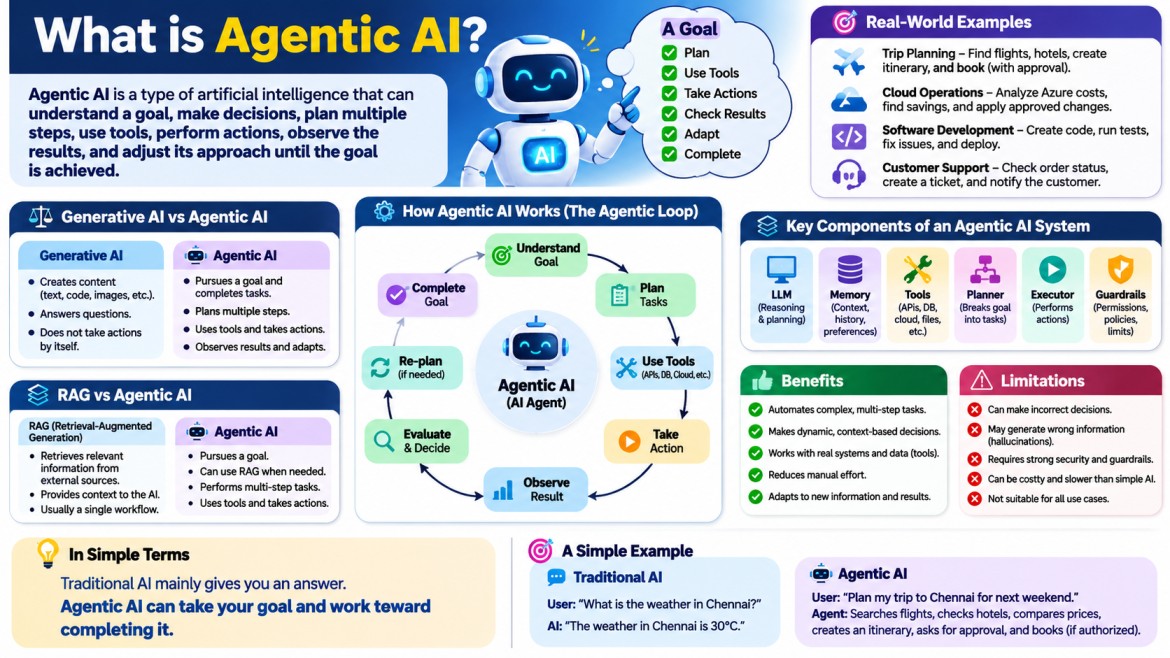


What is Agentic AI?
Agentic AI is a type of artificial intelligence that can understand a goal, make decisions, plan multiple steps, use tools, perform actions, observe the results, and adjust its approach until the goal is achieved.
In simple terms:
Traditional AI mainly gives you an answer. Agentic AI can take your goal and work toward completing it.
For example:
Traditional AI:
User: "What is the weather in Chennai?"
AI:
"The weather in Chennai is 30°C."
Agentic AI:
User: "Plan my trip to Chennai for next weekend."
An agentic AI system could potentially:
- Understand the trip requirement.
- Check available dates.
- Search transportation.
- Search hotels.
- Compare prices.
- Create an itinerary.
- Ask for approval before making a booking.
- Make the booking if authorized.
- Send the final itinerary.
The important difference is action + decision-making + multi-step execution.
Why do we need Agentic AI?
Traditional software normally follows predefined instructions.
For example:
User clicks Login
       ↓
Validate username/password
       ↓
If valid
       ↓
Create session
       ↓
Show dashboard
The developer has explicitly defined almost every step.
But real-world problems are often not this predictable.
Consider:
"Find the best way to reduce our Azure infrastructure cost."
There isn't one fixed sequence.
The system may need to:
Understand the goal
       ↓
Collect Azure usage information
       ↓
Analyze resources
       ↓
Identify expensive resources
       ↓
Compare alternatives
       ↓
Estimate savings
       ↓
Recommend changes
       ↓
Apply approved changes
       ↓
Verify the result
The AI has to reason about what should happen next.
This is where Agentic AI becomes useful.
Agentic AI vs Generative AI
These terms are related, but they are not the same.
Generative AI
Generative AI primarily focuses on creating content.
For example:
- Generate text
- Generate code
- Generate images
- Summarize documents
- Translate languages
- Answer questions
For example:
User:
Write a C# Web API for customer management.

Generative AI:
Here is the C# Web API code...
The AI generates the answer.
Agentic AI
Agentic AI goes further.
User:
Build a customer management API and make it available for testing.
An agent might:
Understand requirement
        ↓
Plan implementation
        ↓
Create project
        ↓
Write API code
        ↓
Create database model
        ↓
Create migrations
        ↓
Run tests
        ↓
Fix errors
        ↓
Build application
        ↓
Deploy application
        ↓
Verify API
        ↓
Report result
So:
Generative AI = creates content
Agentic AI = uses AI capabilities to pursue and complete goals
Generative AI can be one of the major components inside an Agentic AI system.
A simple real-world example
Imagine you have an AI assistant for an online store.
You say:
"Find customers who haven't purchased anything for six months and send them a discount email."
A simple chatbot might explain how to do it.
An agentic system could potentially perform the workflow:
User Goal
   ↓
Understand requirement
   ↓
Query Customer Database
   ↓
Find inactive customers
   ↓
Generate discount offer
   ↓
Create personalized email
   ↓
Send email
   ↓
Monitor delivery
   ↓
Report result
The important point is that the AI is not simply generating text.
It is interacting with external systems and taking actions.
The basic architecture of Agentic AI
A simplified Agentic AI architecture looks like this:
                 User Goal
                    ↓
             ┌─────────────┐
             │    Agent    │
             └─────────────┘
                    ↓
             Understand Goal
                    ↓
               Plan Tasks
                    ↓
              Make Decision
                    ↓
          ┌─────────┴─────────┐
          ↓                   ↓
       Use Tool            Use Memory
          ↓                   ↓
   Database / API        Previous Context
   Search / Code         User Information
          ↓                   ↓
          └─────────┬─────────┘
                    ↓
                  Action
                    ↓
              Observe Result
                    ↓
               Evaluate
                    ↓
           Is Goal Completed?
             ↙           ↘
           No             Yes
           ↓               ↓
      Re-plan          Final Result
           ↓
        Continue
This observe → reason → act → evaluate → repeat behavior is one of the key ideas behind agentic systems.
What is an AI Agent?
Before understanding Agentic AI, it is important to understand the word Agent.
An AI agent is a software system that can:
- Understand a goal.
- Decide what needs to be done.
- Select appropriate tools.
- Perform actions.
- Observe the results.
- Decide what to do next.
A simplified representation is:
Agent = Brain + Memory + Tools + ActionsThe "brain" is often an LLM.
The tools allow the agent to interact with the outside world.
The role of an LLM in Agentic AI
A Large Language Model such as GPT can provide the reasoning and language capabilities.
For example:
User:
Find the three most expensive Azure resources
and suggest ways to reduce the cost.
The LLM can understand:
- What the user wants.
- What information is required.
- What sequence of actions might be useful.
- How to interpret tool results.
- What recommendation should be made.
But the LLM itself normally doesn't automatically have access to your Azure environment.
This is where tools become important.
Tools in Agentic AI
A tool is an external capability that an agent can invoke.
For example:
Agent
  ↓
Azure Cost API
  ↓
Cost information
Other tools could include:
Database
REST API
Web Search
File System
Email
Calendar
CRM
GitHub
Azure
AWS
Calculator
Code Execution
Browser
For example:
User:
Check whether there are any failed orders today.

Agent
   ↓
Database Tool
   ↓
SELECT failed orders
   ↓
Database Result
   ↓
Agent analyzes result
   ↓
Response
The agent doesn't need to know everything itself.
It can use tools to obtain information and perform actions.
Agentic AI is not simply a chatbot
This distinction is very important.
A chatbot generally follows:
User Question
      ↓
AI Response
      ↓
End
An agentic system may follow:
User Goal
      ↓
Understand
      ↓
Plan
      ↓
Tool Call
      ↓
Result
      ↓
Reason
      ↓
Another Tool Call
      ↓
Result
      ↓
Evaluate
      ↓
Another Action
      ↓
Goal Completed
Therefore, an agent can have a workflow that extends across multiple interactions with tools and systems.
The Agentic AI loop
One of the most important concepts is the agent loop.
A simplified agent loop is:
              ┌───────────────┐
              │  User Goal    │
              └───────┬───────┘
                      ↓
              ┌───────────────┐
              │   Reason      │
              └───────┬───────┘
                      ↓
              ┌───────────────┐
              │   Plan        │
              └───────┬───────┘
                      ↓
              ┌───────────────┐
              │   Act         │
              └───────┬───────┘
                      ↓
              ┌───────────────┐
              │  Observe      │
              └───────┬───────┘
                      ↓
              ┌───────────────┐
              │   Evaluate    │
              └───────┬───────┘
                      ↓
                 Goal Done?
                  /      \
                No        Yes
                ↓          ↓
              Re-plan     Finish
                │
                └──────────→ Reason
This is often called an agentic loop.
Step 1: Goal
The agent first needs to understand what the user wants.
For example:
"Find why our website is slow."
This is a high-level goal.
The agent needs to determine what information is required.
It might decide:
1. Check application logs.
2. Check database performance.
3. Check API response times.
4. Check server CPU/memory.
5. Identify the bottleneck.
6. Recommend a solution.
Step 2: Planning
The agent creates a sequence of actions.
For example:
Goal:
Find the performance problem.

Plan:
1. Check API response time.
2. Check SQL queries.
3. Check CPU utilization.
4. Check memory usage.
5. Compare results.
6. Identify bottleneck.
Planning is important because complex tasks usually require multiple steps.
Step 3: Tool selection
The agent determines which tool should be used.
For example:
Need application logs
        ↓
Log Search Tool

Need database performance
        ↓
SQL Query Tool

Need Azure metrics
        ↓
Azure Monitor Tool
This is a major difference from a basic LLM response.
The agent can decide:
"I need external information, so I should call a tool."
Step 4: Action
The agent calls the selected tool.
For example:
Agent
  ↓
Azure Monitor API
  ↓
CPU = 85%
Memory = 72%
Response Time = 4.2 seconds
The agent receives the result.
Step 5: Observation
The agent examines the tool result.
For example:
CPU usage      → Normal
Memory usage   → Normal
API latency    → High
Database query → Very slow
The agent now has new information.
It can change its next action based on that information.
Step 6: Reasoning
The agent might conclude:
"The API latency appears to be caused by a slow database query."
It may then decide:
Next Action:
Inspect slow SQL queries.
This is where agentic behavior becomes powerful.
The next action is determined by the result of the previous action.
Step 7: Re-planning
Suppose the database query is not the problem.
The agent can change its plan.
For example:
Initial assumption:
Database is the bottleneck.

Investigation:
Database is healthy.

New conclusion:
Check external API dependency.

New Plan:
Check external API latency.
This ability to adapt is a core characteristic of agentic systems.
Step 8: Goal completion
Eventually the agent determines that the task is complete.
For example:
Root Cause:
External payment API is taking 3.8 seconds.

Recommendation:
Implement timeout handling and asynchronous processing.
The agent can then provide the result to the user.
Agentic AI and Memory
Memory is another important part of agentic systems.
Without memory:
User
 ↓
Question
 ↓
Answer
 ↓
Conversation Ends
With memory:
Previous interaction
       ↓
Stored information
       ↓
New request
       ↓
Agent retrieves relevant information
       ↓
Uses it for decision-making
Memory can exist at different levels.
Short-term memory
This is the current conversation or current task context.
For example:
User:
Create an API for products.

User:
Use SQL Server.

User:
Use JWT authentication.
The agent remembers the current task requirements.
Long-term memory
Information can be stored for future tasks.
For example:
User prefers:
.NET 8
SQL Server
Clean Architecture
JWT authentication
An agent could retrieve relevant information later.
Agentic AI and RAG
RAG (Retrieval-Augmented Generation) is frequently used with agentic systems.
RAG allows an AI system to retrieve relevant information from an external knowledge source.
For example:
User Question
      ↓
Agent
      ↓
Search Knowledge Base
      ↓
Retrieve Documents
      ↓
LLM
      ↓
Generate Answer
The knowledge base could contain:
- PDF documents
- Company policies
- Product documentation
- Database records
- Technical documentation
- Internal wiki pages
In an agentic system, the agent may decide when it needs retrieval and which knowledge source to use.
RAG vs Agentic AI
They solve different problems.
| RAG | Agentic AI |
|---|---|
| Retrieves information | Pursues a goal |
| Usually focuses on knowledge retrieval | Can perform multi-step tasks |
| Provides context to LLM | Uses reasoning, planning and actions |
| Often one retrieval workflow | Can execute multiple workflows |
| Doesn't inherently perform actions | Can use tools and perform actions |
They can work together:
User
 ↓
Agent
 ↓
Needs company policy
 ↓
RAG Search
 ↓
Relevant Policy
 ↓
Agent
 ↓
Decision
 ↓
Action
Agentic AI and Function Calling / Tool Calling
Modern LLM systems can use tool calling or function calling.
Suppose we have:
getCustomer(customerId)and:
createOrder(customerId, productId)The agent can decide when these functions should be called.
For example:
User:
Create an order for customer 1001
for product 500.
Agent:
1. Call getCustomer(1001)
2. Verify customer
3. Call getProduct(500)
4. Verify product
5. Create order
6. Return order number
The LLM determines which tool should be used and when.
Agentic AI example in .NET
Since you work with .NET, imagine building an IT Support Agent.
A user says:
"My application is returning HTTP 500 errors."
Your agent could have tools such as:
GetApplicationLogs()
GetDatabaseStatus()
GetServerMetrics()
RestartApplication()
SendNotification()
CreateIncident()
The agent might perform:
User reports HTTP 500
        ↓
Agent analyzes problem
        ↓
GetApplicationLogs()
        ↓
Exception found
        ↓
Check database
        ↓
Database unavailable
        ↓
Check database status
        ↓
Database is down
        ↓
Restart database/service
        ↓
Check application again
        ↓
HTTP 200
        ↓
Create incident report
        ↓
Notify administrator
This is a much more advanced workflow than simply answering:
"HTTP 500 means an internal server error."
Agentic AI vs Traditional Automation
Traditional automation:
IF condition A
    THEN perform action B
ELSE
    perform action C
The developer defines the workflow.
Agentic automation:
Goal
 ↓
AI determines what information is required
 ↓
AI chooses appropriate tools
 ↓
AI performs action
 ↓
AI evaluates result
 ↓
AI determines next action
The workflow can therefore be more dynamic.
However, traditional deterministic automation is still preferable when the process is well-defined and safety-critical.
Agentic AI should not replace deterministic software everywhere.
Agentic AI does not mean completely autonomous AI
This is an important misconception.
Agentic systems can have different levels of autonomy.
Level 1 — Recommendation
The agent only recommends an action.
Agent:
The server is overloaded.
I recommend increasing the VM size.
Human performs the action.
Level 2 — Approval required
The agent prepares the action but asks for permission.
Agent:
I recommend restarting the application.

Approve?
[Yes] [No]
Level 3 — Limited autonomy
The agent can perform predefined actions.
If application health check fails:
    Restart application
Level 4 — High autonomy
The agent can independently determine and execute multiple actions within defined boundaries.
For example:
Detect problem
 ↓
Investigate
 ↓
Select solution
 ↓
Apply approved remediation
 ↓
Verify
In production systems, guardrails and authorization boundaries are extremely important.
Multi-Agent AI
An Agentic AI system doesn't always need to contain only one agent.
Multiple specialized agents can work together.
For example:
                  Manager Agent
                       ↓
        ┌──────────────┼──────────────┐
        ↓              ↓              ↓
   Developer       Database       Security
     Agent           Agent          Agent
        ↓              ↓              ↓
      Code          SQL Analysis   Security
      Review        Optimization    Check
Each agent has a specific responsibility.
For example:
Developer Agent
Handles:
- Code generation
- Code analysis
- Refactoring
- Unit tests
Database Agent
Handles:
- SQL analysis
- Query optimization
- Schema analysis
Security Agent
Handles:
- Vulnerability analysis
- Authentication checks
- Security recommendations
A manager/orchestrator agent coordinates the work.
Example of a Multi-Agent System
Suppose the user says:
"Analyze this application for production readiness."
A manager agent might delegate:
Manager Agent
      ↓
 ┌────┼────┬────┐
 ↓    ↓    ↓    ↓
Code DB Security DevOps
Agent Agent Agent Agent
The agents return their findings:
Code Agent:
3 code quality issues.

Database Agent:
2 slow queries.

Security Agent:
JWT configuration needs improvement.

DevOps Agent:
Missing health checks.
The manager agent combines the results:
Production Readiness Report
---------------------------
Code       → Needs improvement
Database   → Needs optimization
Security   → High priority
DevOps     → Add health checks
What is an Agentic Workflow?
An agentic workflow is a sequence in which an AI system dynamically determines what to do next.
For example:
Request
  ↓
Analyze
  ↓
Plan
  ↓
Tool
  ↓
Result
  ↓
Analyze
  ↓
Tool
  ↓
Result
  ↓
Decision
  ↓
Action
  ↓
Verify
The important part is:
The next step can depend on the result of the previous step.
Agentic AI vs Workflow Automation
These concepts are closely related but different.
Fixed workflow
Step 1
 ↓
Step 2
 ↓
Step 3
 ↓
Step 4
Every execution follows the same path.
Agentic workflow
Step 1
 ↓
Result
 ↓
Decision
 ↙      ↘
Path A  Path B
 ↓        ↓
Result   Result
    ↘   ↙
    Decision
       ↓
     Finish
The agent can select different paths based on what it observes.
Important Components of Agentic AI
A practical Agentic AI system commonly contains these components:
             Agentic AI System
                    │
        ┌───────────┼───────────┐
        ↓           ↓           ↓
       LLM        Memory       Tools
        │           │           │
        ↓           ↓           ↓
     Reasoning   Context     External
     Planning    History     Systems
        │
        ↓
      Actions
        │
        ↓
    Observation
        │
        ↓
     Evaluation
        │
        ↓
     Re-planning
Let's look at them individually.
1. LLM
The LLM provides capabilities such as:
- Understanding natural language
- Reasoning
- Planning
- Generating responses
- Selecting tools
- Interpreting tool results
Examples include GPT-class models and other large language models.
The LLM is often the reasoning engine, but it is not the complete agent.
2. Memory
Memory allows the system to retain relevant information.
Examples:
Conversation history
User preferences
Previous task results
Business information
Past decisions
Memory helps the agent maintain context.
3. Tools
Tools allow the agent to interact with external systems.
Examples:
REST APIs
Databases
Search engines
File systems
Cloud platforms
Email
Git repositories
Payment systems
CRM
ERP
Without tools, an agent has limited ability to affect the external world.
4. Planner
The planner determines how a complex goal can be broken into smaller tasks.
For example:
Goal:
Deploy application.

Tasks:
1. Build application.
2. Run tests.
3. Create Docker image.
4. Push image.
5. Deploy container.
6. Verify deployment.
5. Executor
The executor performs the planned actions.
For example:
Build()
RunTests()
CreateDockerImage()
PushImage()
Deploy()
HealthCheck()
6. Observer
The observer examines the results.
For example:
Build → Success
Tests → 2 failed
Deployment → Not executed
The agent can then decide:
"I need to fix the failed tests before deployment."
7. Guardrails
Guardrails prevent the agent from performing dangerous or unauthorized actions.
For example:
Agent wants to delete production database.

Guardrail:
❌ Not allowed.

Agent wants to read production logs.

Guardrail:
✅ Allowed.
Other guardrails can include:
- Permission checks
- Tool restrictions
- Spending limits
- Data access policies
- Approval requirements
- Input validation
- Output validation
8. Human-in-the-loop
Some actions should require human approval.
For example:
Agent:
I found 50 unused Azure resources.

Estimated savings:
₹25,000/month.

I can delete them.

Approve?
The human decides.
This is often much safer than allowing unrestricted autonomy.
Agentic AI and MCP
MCP (Model Context Protocol) is another concept increasingly relevant to agentic systems.
MCP provides a standardized way for AI applications to connect to external tools and data sources.
Conceptually:
                AI Agent
                   ↓
                  MCP
                   ↓
        ┌──────────┼──────────┐
        ↓          ↓          ↓
    Database      Files      APIs
Instead of building a completely custom integration for every AI application, MCP can provide a standardized mechanism for exposing tools and resources.
This makes tool integration particularly useful in agentic architectures.
Agentic AI and APIs
APIs are extremely important for agentic systems.
Suppose your company has:
Customer API
Order API
Payment API
Inventory API
Email API
An agent can use these APIs as tools.
For example:
User:
Check whether customer 1001's order has been shipped.
Agent:
Customer API
     ↓
Get customer

Order API
     ↓
Get order

Shipping API
     ↓
Check shipment

Agent
     ↓
Generate response
Therefore, existing APIs can become the action layer of an agentic system.
Agentic AI and Microservices
Agentic AI can work very well with microservices.
For example:
                 AI Agent
                    ↓
        ┌───────────┼───────────┐
        ↓           ↓           ↓
 Customer       Order       Payment
 Service        Service      Service
The agent can decide which service needs to be called.
This is especially useful when business processes span multiple services.
Agentic AI and Databases
Agents can also work with databases.
For example:
User:
Show me the top 10 products by revenue this month.
The agent could:
Understand request
      ↓
Generate SQL
      ↓
Execute SQL
      ↓
Receive result
      ↓
Analyze result
      ↓
Generate response
However, direct database access should be carefully controlled.
A production agent should ideally use:
- Read-only access where possible
- Restricted database accounts
- Query validation
- Table/column permissions
- Audit logging
- Limits on destructive operations
Agentic AI example: Customer Support Agent
Consider a customer support system.
User:
"My order hasn't arrived yet. Can you check it?"
The agent might perform:
Understand customer request
        ↓
Identify customer
        ↓
Get order details
        ↓
Check shipment status
        ↓
Check expected delivery
        ↓
Determine whether delayed
        ↓
If delayed
    ↓
Create support ticket
        ↓
Notify customer
The agent isn't simply generating a response.
It is investigating and taking appropriate actions.
Agentic AI example: Software Development Agent
Consider:
"Fix the bug where users cannot reset their password."
A development agent could potentially:
Understand issue
      ↓
Inspect repository
      ↓
Search password-reset code
      ↓
Identify possible problem
      ↓
Modify code
      ↓
Create/update tests
      ↓
Run tests
      ↓
Analyze failures
      ↓
Fix code
      ↓
Run tests again
      ↓
Create pull request
      ↓
Summarize changes
This is a strong example of agentic behavior because the system is operating through a multi-step feedback loop.
Agentic AI example: DevOps
Imagine:
"Investigate why the production API is unhealthy."
An agent could potentially:
Check health endpoint
       ↓
Check application logs
       ↓
Check CPU
       ↓
Check memory
       ↓
Check database
       ↓
Check dependencies
       ↓
Identify failure
       ↓
Recommend remediation
       ↓
Request approval
       ↓
Apply fix
       ↓
Verify health
The agent continuously uses observations to determine the next step.
Agentic AI example: Azure
A cloud operations agent might receive:
"Reduce our Azure monthly cost by 15% without affecting production."
The agent could:
Collect Azure cost data
        ↓
Group costs by resource
        ↓
Identify high-cost resources
        ↓
Analyze utilization
        ↓
Identify unused resources
        ↓
Identify oversized resources
        ↓
Calculate possible savings
        ↓
Check production impact
        ↓
Generate recommendations
        ↓
Ask for approval
        ↓
Apply approved changes
        ↓
Verify resources
Notice that this requires:
- Reasoning
- Planning
- Tool usage
- Data retrieval
- Decision-making
- Action
- Verification
That is exactly where agentic architecture becomes useful.
Benefits of Agentic AI
1. Automation of complex tasks
Agents can handle processes that require many steps.
2. Dynamic decision-making
The agent can change its approach based on new information.
3. Tool integration
Agents can interact with:
- APIs
- Databases
- Cloud platforms
- Files
- Business systems
4. Reduced manual effort
A human may only need to provide the goal and approve sensitive actions.
5. Continuous problem solving
The agent can investigate a problem instead of simply providing a static answer.
6. Personalization
With appropriate memory, agents can adapt to user preferences and previous interactions.
Limitations of Agentic AI
Agentic AI is powerful, but it is not magic.
1. Hallucinations
An LLM can generate incorrect information.
Therefore:
AI decision
     ↓
Validation
     ↓
Action
is often necessary.
2. Incorrect decisions
The agent may misunderstand the user's goal or choose a poor strategy.
3. Tool failures
APIs, databases, or external services can fail.
4. Security risks
An agent with powerful permissions can cause significant damage if improperly designed.
5. Cost
Multiple LLM calls and tool operations can become expensive.
6. Latency
A multi-step agent can take longer than a simple API request.
7. Unpredictability
Traditional software generally follows deterministic logic.
Agentic systems can produce different execution paths depending on context and tool results.
Why Guardrails are important
Imagine an agent has this tool:
DeleteDatabase(databaseName)Giving the agent unrestricted access would be dangerous.
A safer architecture is:
Agent
  ↓
Request DeleteDatabase
  ↓
Authorization Layer
  ↓
Policy Check
  ↓
Human Approval
  ↓
Execute
This provides multiple safety controls.
For critical systems, the agent should have least-privilege access.
Agentic AI is not always the best solution
This is an important engineering principle.
Suppose you have:
IF order status = "Paid"
THEN send confirmation email
You don't need Agentic AI.
A normal application workflow is:
- Faster
- Cheaper
- More predictable
- Easier to test
- Easier to maintain
Agentic AI is more appropriate when:
- The problem is complex.
- The path is not always predictable.
- Decisions are required.
- Multiple tools are involved.
- Natural language is important.
- The system needs to adapt to results.
Traditional Application vs Agentic Application
Traditional application
Input
  ↓
Business Rules
  ↓
Database
  ↓
Business Rules
  ↓
Output
Agentic application
Goal
 ↓
LLM
 ↓
Plan
 ↓
Tool
 ↓
Observe
 ↓
Reason
 ↓
Tool
 ↓
Observe
 ↓
Re-plan
 ↓
Action
 ↓
Verify
 ↓
Result
The second model introduces dynamic reasoning and action selection.
A simple formula for understanding Agentic AI
You can remember Agentic AI using this model:
Agentic AI
=
Goal
+
Reasoning
+
Planning
+
Memory
+
Tools
+
Action
+
Observation
+
Feedback
Or even more simply:
Understand → Plan → Act → Observe → Decide → RepeatThat is the core idea.
Generative AI → RAG → Agentic AI
These technologies can be viewed as different levels of capability.
Generative AI
      ↓
Generate content
      ↓
RAG
      ↓
Retrieve external knowledge
      ↓
Agentic AI
      ↓
Reason + Plan + Use Tools + Act
For example:
Generative AI
"Explain our refund policy."
RAG
"Search our company policy documents and explain the refund policy."
Agentic AI
"Check this customer's order, determine whether they qualify for a refund according to company policy, create the refund request, and notify the customer."
The progression is:
Generate
   ↓
Retrieve
   ↓
Reason
   ↓
Act
A practical Agentic AI architecture for a .NET developer
A possible architecture could look like:
                    User
                     ↓
                React / Angular
                     ↓
                ASP.NET Core API
                     ↓
                Agent Orchestrator
                     ↓
              ┌──────┴──────┐
              ↓             ↓
             LLM          Memory
              ↓
          Tool Selection
              ↓
      ┌───────┼────────┬────────┐
      ↓       ↓        ↓        ↓
    SQL     REST      Search    Azure
   Tool      API       Tool      Tool
      ↓       ↓        ↓        ↓
      └───────┴────────┴────────┘
                     ↓
                  Result
                     ↓
               Validation
                     ↓
                  Action
                     ↓
                 Response
For a .NET implementation, your tools could be represented as services such as:
ICustomerTool
IOrderTool
IProductTool
IEmailTool
IAzureTool
IDatabaseTool
The agent orchestrator decides which tool is required.
A complete example
Suppose the user says:
"Find customers whose orders were delayed and send them an apology email with a 10% discount."
An agentic system could execute:
1. Understand request
        ↓
2. Query orders
        ↓
3. Find delayed orders
        ↓
4. Get affected customers
        ↓
5. Check whether discount is allowed
        ↓
6. Generate personalized email
        ↓
7. Request approval if required
        ↓
8. Send emails
        ↓
9. Record the action
        ↓
10. Report completed customers
Notice how the original request is only one sentence, but completing it requires many operations.
This is the kind of problem Agentic AI is designed to handle.
The most important concept to remember
Agentic AI should not be understood simply as:
"An AI that can think."
A better definition is:
Agentic AI is an AI system designed to pursue a goal by reasoning about what needs to be done, planning and executing actions through tools, observing the results, and adapting its next steps until the task is completed or requires human intervention.
The key words are:
Goal
 ↓
Reason
 ↓
Plan
 ↓
Tool
 ↓
Action
 ↓
Observe
 ↓
Adapt
 ↓
Complete
That feedback loop is what makes an AI system agentic.
Agentic AI in one real-world sentence
If you remember only one example, remember this:
ChatGPT-style Generative AI can tell you how to fix a production problem; an Agentic AI system can potentially investigate the problem using logs and monitoring tools, decide what to do next, apply an authorized fix, verify the result, and report back.
That is the fundamental difference between generating an answer and pursuing a goal through actions.