

Semantic Search
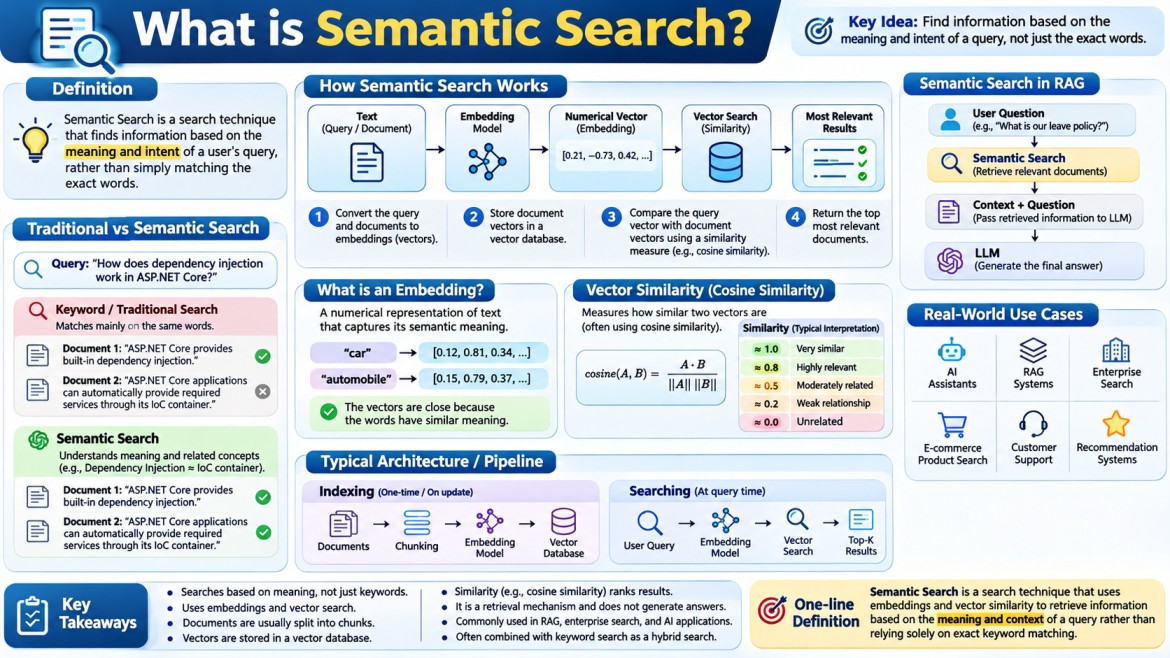
Semantic Search is a search technique that finds information based on the meaning and intent of a user's query, rather than simply matching the exact words.
In simple terms:
Traditional search asks: “Do these documents contain the same words?”
Semantic search asks: “Which documents contain information that means something similar to what the user is asking?”
This is one of the fundamental technologies behind modern AI search, RAG (Retrieval-Augmented Generation), recommendation systems, enterprise search, and AI assistants.
1. Traditional Search vs Semantic Search
Suppose you have the following documents:
Document 1
"ASP.NET Core provides built-in dependency injection."
Document 2
"ASP.NET Core applications can automatically provide required services through its IoC container."
Document 3
"React uses components to build user interfaces."
Now the user searches:
"How does dependency injection work in ASP.NET Core?"
A traditional keyword search looks primarily for words such as:
dependency
injection
ASP.NET
Core
Document 1 contains almost exactly those terms, so it ranks highly.
Document 2 might also be relevant, even though it uses:
IoC container
provide required services
instead of exactly saying:
dependency injectionA semantic search engine understands that:
Dependency Injectionand:
IoC container providing required servicesare conceptually related.
Therefore, Document 2 can also receive a high relevance score.
2. The Core Idea
Semantic search generally works by converting text into embeddings.
For example:
"How does dependency injection work?"is converted into a numerical vector such as:
[0.21, -0.73, 0.42, 0.18, 0.91, ...]A document is also converted into a vector:
"ASP.NET Core uses an IoC container to provide required services."becomes something like:
[0.19, -0.69, 0.45, 0.21, 0.87, ...]The vectors are then compared.
If their vectors are close in semantic/vector space, the search engine considers them similar.
Conceptually:
User Query
    |
    v
Embedding Model
    |
    v
Query Vector
    |
    v
Vector Search
    |
    +---- Document A Vector
    +---- Document B Vector
    +---- Document C Vector
    |
    v
Similarity Calculation
    |
    v
Most Relevant Documents
3. What is an Embedding?
An embedding is a numerical representation of data that captures its semantic characteristics.
For example:
"car"and:
"automobile"have different words but similar meanings.
An embedding model may produce vectors that are relatively close:
car          → [0.12, 0.81, 0.34, ...]
automobile   → [0.15, 0.79, 0.37, ...]
Whereas:
carand:
database normalizationwould generally be much farther apart in vector space.
The important idea is:
Embeddings transform human language into mathematical representations that machines can compare for semantic similarity.
4. Why Do We Need Embeddings?
Computers don't inherently understand the meaning of sentences.
Consider:
"How can I reset my password?"and:
"I forgot my password. How do I create a new one?"A keyword-based system sees:
reset
password
versus:
forgot
password
create
new
There is only partial word overlap.
But semantically, both questions are about:
Password recoveryEmbeddings allow the system to represent their meanings in a way that makes this relationship searchable.
5. Semantic Search Example
Imagine an e-commerce website has these products:
Product A:
"Running shoes for professional athletes"

Product B:
"Lightweight footwear designed for jogging"

Product C:
"Leather formal shoes for office wear"

Product D:
"Casual sneakers for everyday use"
User searches:
"Shoes for running"
A traditional search may strongly favor products containing:
runningSemantic search understands:
running
jogging
athletic footwear
sports shoes
as related concepts.
Therefore, the ranking might look like:
1. Running shoes for professional athletes
2. Lightweight footwear designed for jogging
3. Casual sneakers for everyday use
4. Leather formal shoes
Even though Product B doesn't contain the word running, it can still be considered highly relevant.
6. Semantic Search Architecture
A typical semantic search system looks like this:
                    ┌──────────────────┐
                    │      User        │
                    │      Query       │
                    └────────┬─────────┘
                             │
                             v
                    ┌──────────────────┐
                    │  Embedding Model  │
                    └────────┬─────────┘
                             │
                             v
                    ┌──────────────────┐
                    │   Query Vector   │
                    └────────┬─────────┘
                             │
                             v
                    ┌──────────────────┐
                    │   Vector Search  │
                    └────────┬─────────┘
                             │
              ┌──────────────┼──────────────┐
              v              v              v
          Document 1      Document 2     Document 3
          Vector          Vector         Vector
              │              │              │
              └──────────────┼──────────────┘
                             v
                    ┌──────────────────┐
                    │ Similarity Score  │
                    └────────┬─────────┘
                             │
                             v
                    ┌──────────────────┐
                    │ Ranked Results    │
                    └──────────────────┘
7. There Are Actually Two Embedding Operations
This is an important concept.
When you build semantic search, you normally generate embeddings for documents and for the user's query.
During indexing
Documents are converted into embeddings:
Document
   ↓
Embedding Model
   ↓
Vector
   ↓
Vector Database
For example:
Document 1 → [0.12, 0.54, 0.91, ...]
Document 2 → [0.31, 0.22, 0.78, ...]
Document 3 → [0.87, 0.11, 0.43, ...]
During searching
The user's query is converted into an embedding:
User Query
   ↓
Embedding Model
   ↓
Query Vector
The system then compares the query vector against the stored document vectors.
8. Document Indexing
Suppose you have a technical knowledge base containing:
ASP.NET Core Dependency Injection
ASP.NET Core Middleware
Entity Framework Core
JWT Authentication
Azure App Service
Docker Containers
Before users can perform semantic searches, the documents need to be indexed.
The process is approximately:
Documents
    ↓
Extract Text
    ↓
Split into Chunks
    ↓
Generate Embeddings
    ↓
Store Embeddings
    ↓
Vector Database
For example:
Article:
"Dependency Injection in ASP.NET Core"
could be divided into chunks:
Chunk 1:
"What is Dependency Injection?"

Chunk 2:
"ASP.NET Core provides a built-in IoC container..."

Chunk 3:
"Services can be registered using AddScoped..."

Chunk 4:
"Dependency injection reduces tight coupling..."
Each chunk gets its own embedding.
9. Why Do We Split Documents into Chunks?
This is especially important in RAG systems.
Imagine a 50-page technical document.
You could create one embedding for the entire document:
50-page document
       ↓
   One vector
But that vector represents a huge amount of information.
A query such as:
"How do I configure JWT authentication?"
may only need information from page 18.
Therefore, the document is divided into smaller chunks:
Document
   |
   +-- Chunk 1
   +-- Chunk 2
   +-- Chunk 3
   +-- ...
   +-- Chunk 50
Each chunk gets its own vector.
Then semantic search can retrieve the specific relevant chunk.
10. Vector Database
Once embeddings are generated, they need to be stored somewhere.
This is where a Vector Database comes into the picture.
Examples include:
- Pinecone
- Qdrant
- Weaviate
- Milvus
- Chroma
- pgvector with PostgreSQL
- Azure AI Search
A vector database stores information similar to:
ID: 101
Text: "ASP.NET Core provides built-in dependency injection..."
Vector: [0.21, 0.73, 0.42, ...]
Metadata:
    Category = ".NET"
    ArticleId = 101
Then a search can be performed against the vector.
11. What Happens When the User Searches?
Suppose the user enters:
How does dependency injection work in ASP.NET Core?Step 1 — Query
User Query
    ↓
"How does dependency injection work in ASP.NET Core?"
Step 2 — Generate embedding
The embedding model converts it:
Query
 ↓
Embedding Model
 ↓
[0.23, 0.71, 0.41, 0.19, ...]
Step 3 — Vector search
The vector database compares the query vector against stored vectors.
Query Vector
      |
      +---- Document A → similarity 0.92
      +---- Document B → similarity 0.87
      +---- Document C → similarity 0.31
      +---- Document D → similarity 0.18
Step 4 — Ranking
The highest-scoring documents are returned:
1. Dependency Injection in ASP.NET Core     0.92
2. ASP.NET Core Service Registration       0.87
3. Middleware in ASP.NET Core              0.31
12. Similarity Score
The search system needs a mathematical way to determine:
How similar are these two vectors?
One of the most commonly used techniques is cosine similarity.
The formula is:
\[ \text{Cosine Similarity} = \frac{A \cdot B} {\|A\|\|B\|} \]
Where:
A= query vectorB= document vectorA · B= dot product||A||= magnitude of vector A||B||= magnitude of vector B
The result indicates how closely the vectors align.
Conceptually:
Similarity
    ↑
1.0 |        Very similar
    |
0.8 |        Highly relevant
    |
0.5 |        Moderately related
    |
0.2 |        Weak relationship
    |
0.0 |        Unrelated
    +------------------------>
The exact interpretation depends on the embedding model and search system, so you should not assume that a particular score such as 0.8 always means "80% relevant."
13. Semantic Search vs Keyword Search
This distinction is extremely important.
| Feature | Keyword Search | Semantic Search |
|---|---|---|
| Main technique | Word matching | Meaning matching |
| Understands synonyms | Limited | Yes |
| Understands context | Limited | Better |
| Requires exact words | Often | No |
| Uses embeddings | No | Yes |
| Uses vector search | Usually no | Yes |
| Handles natural language | Limited | Strong |
| Good for exact IDs | Excellent | Usually not ideal |
| Good for conceptual queries | Limited | Excellent |
Example:
Query:
"How can I make my application run faster?"
Keyword search may look for:
make
application
run
faster
Semantic search can understand concepts such as:
application performance
optimization
performance tuning
latency reduction
speed improvement
14. Semantic Search Does Not Mean "AI Understands Everything"
This is an important misconception.
Semantic search doesn't literally "understand" language like a human.
Instead, the embedding model has learned statistical relationships between words, phrases, sentences, and concepts from its training data.
It creates a numerical representation that makes related meanings mathematically closer.
So:
Human Meaning
      ↓
Embedding Model
      ↓
Numerical Representation
      ↓
Similarity Search
It is more accurate to think of semantic search as:
Mathematical similarity based on learned representations of meaning.
15. Example with Your Technical Articles
Suppose your website contains these articles:
1. What is a Vector Database?
2. What is RAG?
3. What is an Embedding Model?
4. What is a Tokenizer?
5. What is Docker?
6. What is Azure App Service?
A user searches:
"How does ChatGPT find relevant information from a knowledge base?"
There may not be an article containing the exact sentence.
But semantic search can identify:
What is RAG?and:
What is a Vector Database?because they are semantically related to:
knowledge retrieval
relevant information
AI
vector search
RAG
16. Semantic Search in RAG
Semantic search becomes especially powerful when combined with RAG.
RAG means:
Retrieval-Augmented Generation
The architecture is:
                 User Question
                       |
                       v
                Embedding Model
                       |
                       v
                  Query Vector
                       |
                       v
                Vector Database
                       |
                       v
             Relevant Documents
                       |
                       v
              Context + Question
                       |
                       v
                   LLM
                       |
                       v
                 Final Answer
For example:
User:
"What is our company's leave policy?"
Semantic search retrieves relevant company policy documents.
Then:
Retrieved Documents
        +
User Question
        ↓
       LLM
        ↓
Answer
The LLM doesn't need to know your company's private leave policy from its original training data.
It receives the relevant information from the retrieval system.
17. Semantic Search + RAG
These two concepts should not be confused.
Semantic Search
Its job is:
Find relevant information.
LLM
Its job is:
Understand the retrieved information and generate a response.
RAG
Combines them:
Semantic Search
      +
LLM
      =
RAG
More precisely:
User Question
      ↓
Retrieve Relevant Information
      ↓
Augment Prompt with Information
      ↓
LLM Generates Answer
18. Semantic Search vs Vector Search
These terms are closely related but are not exactly identical.
Semantic Search
Describes the search behavior:
Find results based on meaning.
Vector Search
Describes the technical mechanism commonly used to perform that search:
Search numerical vectors for similar vectors.
So:
Semantic Search
       ↓
Often implemented using
       ↓
Vector Embeddings
       ↓
Vector Search
       ↓
Similarity Ranking
However, semantic search can also involve other techniques such as hybrid retrieval, reranking, and semantic ranking.
19. Hybrid Search
In production systems, relying only on semantic search is not always ideal.
Consider this query:
Find ticket INC-45892A semantic search engine may understand the general meaning of the query, but exact matching is better for an identifier.
This is where hybrid search becomes useful.
Hybrid search combines:
Keyword Search
        +
Semantic / Vector Search
For example:
                  User Query
                      |
          ┌───────────┴───────────┐
          ↓                       ↓
   Keyword Search          Vector Search
          |                       |
          ↓                       ↓
    Exact matches          Semantic matches
          |                       |
          └───────────┬───────────┘
                      ↓
                Ranking / Fusion
                      ↓
                Final Results
This can give better results than either approach alone.
20. Example: Hybrid Search
Suppose your database contains:
"Azure App Service deployment failed"

"Deploying .NET application to Azure App Service"

"Azure Container Apps deployment"

"How to deploy Docker containers"
User searches:
"Azure deployment error"Semantic search may identify:
Azure App Service deployment failedbecause it understands the relationship between:
error
failed
deployment
Keyword search may prioritize documents containing:
Azure
deployment
A hybrid system combines both signals.
21. Metadata Filtering
Semantic search can also be combined with metadata filters.
Suppose you have:
Article
Category
Technology
Author
PublishedDate
The user searches:
"How does RAG work?"
But wants only:
Technology = AIThe search can perform:
Vector Similarity
       +
Metadata Filter
For example:
WHERE Category = 'AI'followed by vector similarity search.
This is very common in enterprise applications.
22. Semantic Search in an Enterprise Application
Imagine an organization has:
10,000 PDF documents
50,000 support tickets
20,000 technical articles
100,000 knowledge-base records
A traditional search system might search keywords.
A semantic search system can allow employees to ask natural-language questions:
"What should I do if production database connectivity fails?"The system can retrieve documents containing concepts such as:
database connection failure
SQL connectivity
production database
connection timeout
network troubleshooting
even if the exact wording differs.
23. Semantic Search Pipeline
A production semantic-search system usually has two major pipelines.
A. Indexing Pipeline
This happens when documents are added or updated.
Document
   ↓
Text Extraction
   ↓
Cleaning
   ↓
Chunking
   ↓
Embedding Generation
   ↓
Metadata Creation
   ↓
Vector Database
For example:
PDF
 ↓
Extract text
 ↓
Split into 500-token chunks
 ↓
Generate embeddings
 ↓
Store vectors + metadata
24. Search Pipeline
When the user performs a search:
User Query
     ↓
Query Embedding
     ↓
Vector Search
     ↓
Similarity Ranking
     ↓
Top-K Results
     ↓
Optional Reranking
     ↓
Final Results
For example:
Top K = 5means the system retrieves the five most relevant chunks/documents.
25. What is Reranking?
Vector similarity isn't always enough.
Suppose the initial search returns:
Result 1 → 0.91
Result 2 → 0.89
Result 3 → 0.88
Result 4 → 0.86
Result 5 → 0.84
A reranker can examine the query and retrieved documents more deeply and reorder them.
Initial Retrieval
       ↓
Top 20 results
       ↓
Reranker
       ↓
Top 5 best results
This is particularly useful in high-quality RAG systems.
26. Semantic Search Does Not Search the Original Text Directly
This is another important concept.
Suppose you have:
"ASP.NET Core provides built-in dependency injection."The vector database generally isn't storing the sentence as the thing being searched mathematically.
It stores an embedding such as:
[0.15, 0.73, 0.42, 0.91, ...]Usually, however, the original text is stored alongside the vector:
ID
Text
Embedding
Metadata
So the system can return the original content after finding the vector.
Conceptually:
                    Vector Database
              ┌─────────────────────────┐
              │ ID                       │
              │ Text                     │
              │ Embedding                │
              │ Metadata                 │
              └─────────────────────────┘
27. What Determines the Quality of Semantic Search?
Several factors affect search quality.
1. Embedding Model
A good embedding model produces useful semantic representations.
2. Chunking Strategy
Poor chunking can destroy context.
For example:
Chunk 1:
"JWT authentication requires..."

Chunk 2:
"...a valid access token."
Splitting important information incorrectly can reduce retrieval quality.
3. Chunk Size
Very small chunks:
Too little contextVery large chunks:
Too much irrelevant informationThe appropriate size depends on the content and retrieval task.
4. Metadata
Useful metadata allows filtering:
category
author
date
department
document type
security level
5. Similarity Metric
Common approaches include:
Cosine similarity
Dot product
Euclidean distance
6. Reranking
A reranker can improve the final ordering.
28. Common Embedding Models
Different systems use different embedding models.
Examples include models from:
- OpenAI
- Cohere
- Voyage AI
- Sentence Transformers
- other open-source embedding providers
The important point is that the query and documents should generally be embedded using a compatible embedding model/setup so their vectors occupy the same semantic space.
29. A Simple .NET Conceptual Example
Imagine your ASP.NET Core application has:
Article
---------
Id
Title
Content
Category
When an article is created:
var embedding = await embeddingService.GenerateEmbeddingAsync(
    article.Content);
Then you store:
Article ID
Title
Content
Embedding
Category
When a user searches:
"How does dependency injection work?"your API does something like:
var queryEmbedding =
    await embeddingService.GenerateEmbeddingAsync(query);
Then:
queryEmbedding
       ↓
Vector Search
       ↓
Relevant Articles
       ↓
Return Results
The actual implementation depends on the vector database/search platform you're using.
30. Example Database Structure
Conceptually:
Article
------------------------------------------------
Id          101
Title       Dependency Injection in ASP.NET Core
Content     ASP.NET Core provides...
Embedding   [0.12, 0.73, 0.42, ...]
Category    .NET
Another article:
Article
------------------------------------------------
Id          102
Title       Understanding IoC Containers
Content     An IoC container manages...
Embedding   [0.15, 0.71, 0.44, ...]
Category    .NET
A query:
"How does dependency injection work?"may retrieve both because their embeddings represent related concepts.
31. Important Difference: Search vs Generation
Semantic search does not generate an answer.
Suppose the user asks:
"What is dependency injection?"Semantic search might return:
Document 1
Document 7
Document 15
That's the search part.
If an LLM then reads those documents and generates:
"Dependency Injection is a design pattern..."
that's generation.
So:
Semantic Search
      ↓
Retrieval
      ↓
Documents
      ↓
LLM
      ↓
Generated Answer
This distinction is fundamental when learning RAG.
32. Real-World Applications
Semantic search is used in many systems.
AI Assistants
Natural-language questions
        ↓
Relevant knowledge
RAG
Question
   ↓
Semantic Retrieval
   ↓
LLM
Enterprise Search
Search across:
PDFs
Emails
Documents
Tickets
Knowledge bases
E-commerce
Search:
"comfortable shoes for walking"instead of requiring exact product keywords.
Customer Support
A customer asks:
"My application keeps disconnecting from the database."The system can find support articles about:
connection timeout
database connectivity
connection pooling
network failures
Recommendation Systems
Products/content can be recommended based on semantic similarity.
33. Semantic Search and Your Agentic AI Series
Since you're building an Agentic AI article series, semantic search is an excellent topic because it connects several concepts you've already been covering.
A logical progression is:
Token
   ↓
Tokenizer
   ↓
Embedding
   ↓
Vector Database
   ↓
Semantic Search
   ↓
RAG
   ↓
Agents
   ↓
Agentic AI
The relationships are:
Tokenizer
   ↓
Text processing

Embedding Model
   ↓
Text → Vector

Vector Database
   ↓
Store vectors

Semantic Search
   ↓
Find relevant vectors

RAG
   ↓
Retrieve information + LLM

Agentic AI
   ↓
Agents use tools/retrieval/reasoning
This makes Semantic Search a very natural article after Tokenizer and Vector Database.
34. One Complete Example
Let's put everything together.
Suppose you have this document:
ASP.NET Core Dependency Injection

ASP.NET Core includes a built-in dependency injection container.
Services can be registered using AddTransient, AddScoped and AddSingleton.
Step 1 — Chunk
Chunk 1:
ASP.NET Core includes a built-in dependency injection container.

Chunk 2:
Services can be registered using AddTransient, AddScoped and AddSingleton.
Step 2 — Generate embeddings
Chunk 1
   ↓
Embedding Model
   ↓
Vector A

Chunk 2
   ↓
Embedding Model
   ↓
Vector B
Step 3 — Store
Vector Database

Vector A → Chunk 1
Vector B → Chunk 2
Step 4 — User query
"How can I register services in ASP.NET Core?"Step 5 — Generate query embedding
Query
 ↓
Embedding Model
 ↓
Query Vector
Step 6 — Search
Query Vector
      ↓
Vector A → 0.82
Vector B → 0.94
Step 7 — Ranking
1. Chunk 2 → 0.94
2. Chunk 1 → 0.82
The system returns Chunk 2 first because it is more semantically relevant to service registration.
35. The Entire Concept in One Diagram
                    DOCUMENTS
                       |
                       v
                Text Extraction
                       |
                       v
                    Chunking
                       |
                       v
                Embedding Model
                       |
                       v
                  Embeddings
                       |
                       v
                Vector Database
                       |
                       |
                  USER QUERY
                       |
                       v
                Embedding Model
                       |
                       v
                  Query Vector
                       |
                       v
                 Vector Search
                       |
                       v
              Similarity Calculation
                       |
                       v
                  Top Results
                       |
                       v
                  Reranking
                       |
                       v
               Relevant Documents
                       |
                       +------------------+
                       |                  |
                       v                  v
                 Display Results          LLM
                                          |
                                          v
                                     Generated Answer
36. The Most Important Points to Remember
If you're preparing for interviews, remember these points:
-
Semantic Search searches based on meaning rather than exact keyword matching.
-
Embeddings convert text into numerical vectors.
-
Documents and queries are represented as vectors in the same semantic space.
-
Vector search finds vectors that are mathematically similar to the query vector.
-
Cosine similarity is a commonly used similarity measure.
-
Documents are usually divided into chunks before embedding.
-
A vector database stores embeddings along with the original content and metadata.
-
Semantic search is a retrieval mechanism; it does not itself generate an answer.
-
RAG combines retrieval with an LLM to generate answers using retrieved context.
-
Hybrid search combines keyword and semantic/vector search and is often better for production systems.
-
Reranking can further improve the relevance of retrieved results.
-
Semantic search is one of the core building blocks of modern RAG and AI applications.
One-line definition for an interview
Semantic Search is a search technique that uses embeddings and vector similarity to retrieve information based on the meaning and context of a query rather than relying solely on exact keyword matching.