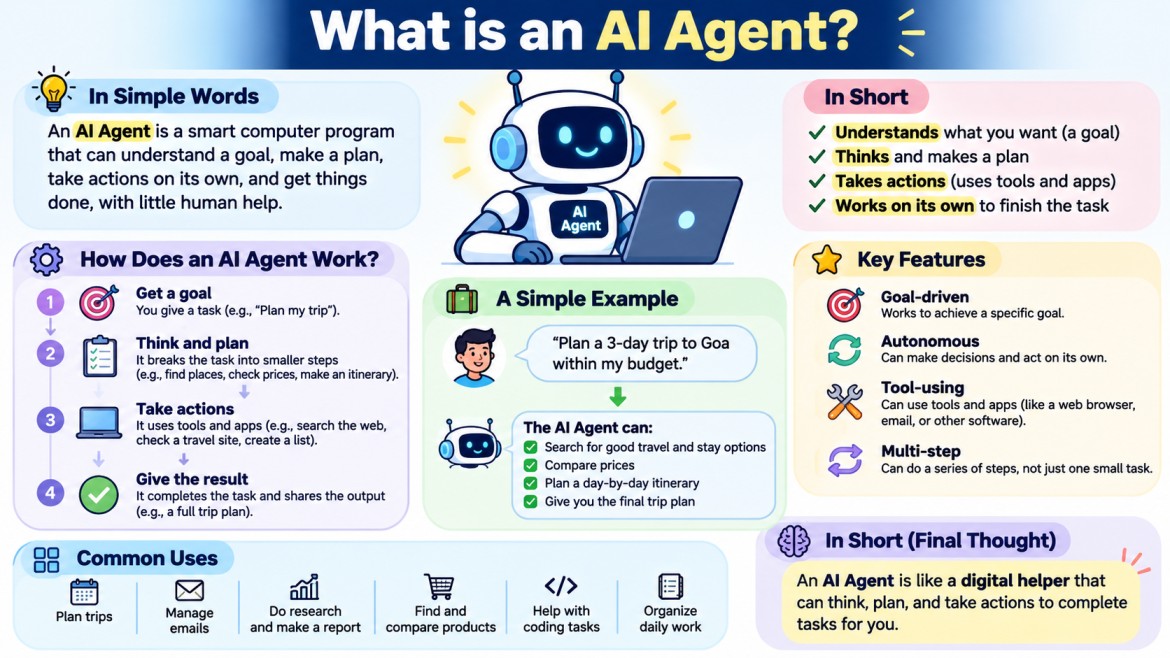


AI Agent
An AI Agent is a software system that uses Artificial Intelligence to understand a goal, think about what needs to be done, use tools, perform actions, check the results, and continue working until the goal is completed.
The simplest way to understand an AI Agent is:
An AI Agent is an AI system that can not only answer questions, but can also decide what to do and take actions to complete a task.
For example, a normal AI chatbot might answer:
"How can I deploy my .NET application to Azure?"
An AI Agent could be given:
"Deploy my .NET application to Azure."
The agent could then:
Understand the request
        ↓
Check the project
        ↓
Build the application
        ↓
Run tests
        ↓
Create deployment package
        ↓
Connect to Azure
        ↓
Deploy the application
        ↓
Check whether deployment succeeded
        ↓
If failed → investigate and try to fix it
        ↓
Report the result
This ability to understand → decide → act → observe → decide again is the main idea behind an AI Agent.
AI Agent in Simple Words
Think about the difference between asking a person for information and asking a person to complete a task.
You say:
"What is the current temperature?"
The person can simply tell you the temperature.
But if you say:
"Please plan my trip for tomorrow."
The person needs to do several things:
- Understand where you want to go.
- Check the weather.
- Check available transportation.
- Find a suitable hotel.
- Compare prices.
- Create a plan.
- Tell you the final plan.
An AI Agent works in a similar way.
It receives a goal, decides what actions are required, uses available tools, checks the results, and continues until the task is completed.
AI Agent = AI + Tools + Actions + Decision Making
A simple way to remember an AI Agent is:
AI Agent
   =
AI Model
   +
Instructions
   +
Tools
   +
Decision Making
   +
Actions
   +
Memory/State
   +
Feedback Loop
Not every agent must have every component in exactly this form, but these are the major building blocks used in agentic systems.
The important point is:
An LLM by itself is not necessarily an AI Agent.
An LLM can provide the intelligence for an agent, while the surrounding software gives it tools, memory, execution capabilities, and control.
What Does an AI Agent Actually Do?
An AI Agent usually performs a continuous cycle.
Understand Goal
      ↓
Observe Information
      ↓
Think / Reason
      ↓
Plan
      ↓
Choose an Action
      ↓
Use a Tool
      ↓
Observe Result
      ↓
Think Again
      ↓
Choose Next Action
      ↓
Repeat
      ↓
Complete Goal
This is often called the Agentic Loop.
The loop is one of the most important concepts to understand when learning Agentic AI.
The Agentic Loop
Let's take a simple example.
Suppose you tell an AI Agent:
"Find why my website is showing HTTP 500 errors."
The agent might work like this:
User Goal
   ↓
Find cause of HTTP 500 error
   ↓
Check application status
   ↓
Read application logs
   ↓
Find database connection error
   ↓
Check database configuration
   ↓
Find incorrect connection string
   ↓
Fix configuration
   ↓
Restart application
   ↓
Check website again
   ↓
HTTP 200
   ↓
Problem solved
Notice something important.
The agent does not necessarily know the complete answer at the beginning.
It discovers information step by step.
That is an important characteristic of agentic behavior.
AI Agent vs Normal AI Response
Consider this example:
"My API is returning HTTP 500."
Normal AI
A normal AI response might say:
HTTP 500 usually indicates an internal server error.

Check:
- Application logs
- Database connection
- Configuration
- Exceptions
- Dependencies
This is useful, but you still need to investigate the problem.
AI Agent
An AI Agent might be able to:
Check API
    ↓
Read logs
    ↓
Find exception
    ↓
Check configuration
    ↓
Identify problem
    ↓
Fix configuration
    ↓
Restart application
    ↓
Test API
So the difference is:
Normal AI:
Tell me what I should do.

AI Agent:
I can determine what needs to be done and perform the available actions.
The Main Characteristics of an AI Agent
An AI Agent generally has several important characteristics.
1. It Has a Goal
An agent needs something to accomplish.
For example:
Find the cheapest flight.or:
Fix the production error.or:
Create a monthly sales report.or:
Answer a customer and update the support ticket.The goal gives the agent a direction.
Without a goal, there is no meaningful task for the agent to accomplish.
2. It Can Understand the Goal
The user may not provide detailed instructions.
For example:
"Prepare my monthly sales report."
The user does not explain every step.
The agent needs to understand that this could mean:
Get sales data
     ↓
Calculate total sales
     ↓
Compare with previous month
     ↓
Find top products
     ↓
Find low-performing products
     ↓
Create report
The agent converts the high-level request into actions.
3. It Can Reason
Reasoning means determining what should happen next.
Suppose the agent wants to create a sales report.
It tries to retrieve sales data and receives:
Database unavailableThe agent needs to decide:
Should I retry?
Should I use another database?
Should I wait?
Should I inform the user?
The answer depends on the situation.
This ability to make decisions based on available information is an important part of an AI Agent.
4. It Can Make Decisions
An agent may have several possible actions.
For example:
Customer has a delayed order.

Possible actions:

1. Check shipping status
2. Contact shipping provider
3. Create support ticket
4. Offer refund
5. Send notification
The agent decides which action is appropriate based on:
- User request
- Available information
- Business rules
- Tool results
- Previous actions
- Permissions
5. It Can Use Tools
Tools are one of the most important parts of an AI Agent.
An AI model by itself mainly generates and understands information.
Tools allow the agent to interact with the outside world.
Examples:
Web Search
Database
Calculator
Email
Calendar
REST API
Git
File System
Docker
Azure
AWS
CRM
Payment System
Monitoring System
For example:
User:
"What is my order status?"
The agent can call:
Order APIThe API might return:
Order ID: 1001
Status: Shipped
Expected Delivery: Tomorrow
The agent then explains the result to the user.
Tools Give an Agent Real Capabilities
Without tools:
AI Model
    ↓
Generate text
With tools:
AI Model
    ↓
Decide what information is needed
    ↓
Call Tool
    ↓
External System
    ↓
Receive Result
    ↓
Understand Result
    ↓
Decide Next Action
This is a major difference.
Example of Tool Usage
Imagine an AI Agent has these tools:
GetCustomer()
GetOrder()
GetShippingStatus()
CreateRefund()
SendEmail()
The user says:
"My order is late. Please check it and refund me if I am eligible."
The agent might do:
1. GetCustomer()
        ↓
2. GetOrder()
        ↓
3. GetShippingStatus()
        ↓
4. Check refund policy
        ↓
5. Customer is eligible
        ↓
6. CreateRefund()
        ↓
7. SendEmail()
The agent is coordinating several different operations.
What Is Tool Calling?
Tool calling means allowing an AI model to request that an external function or service be executed.
For example, the agent may determine:
I need the customer's order information.It can request:
GetOrder(orderId = 1001)The application executes the function.
The function returns:
{
    "orderId": 1001,
    "status": "Shipped",
    "amount": 2500
}
The result is given back to the agent.
The agent can then continue.
Tool Result
     ↓
Agent understands result
     ↓
Decides next action
     ↓
Another tool call
This is the basic mechanism behind many tool-using AI agents.
6. It Can Take Actions
An AI Agent should not be limited to generating text.
It can perform actions when the required tools and permissions are available.
For example:
Create an invoice
Send an email
Create a support ticket
Update a database
Create a GitHub issue
Deploy an application
Restart a service
Generate a report
Update a CRM record
For example:
User:
"Create a support ticket for this problem."

Agent
   ↓
Understand problem
   ↓
CreateTicket() tool
   ↓
Ticket created
   ↓
Return ticket number
7. It Can Observe Results
After an agent performs an action, it needs to know what happened.
For example:
Agent:
Deploy application.
The deployment system returns:
Deployment FailedThe agent can then inspect the result.
Deployment failed
       ↓
Read deployment logs
       ↓
Database connection failed
       ↓
Check configuration
       ↓
Fix configuration
       ↓
Deploy again
This is called observation.
The agent does not simply execute an action and stop.
It can use the result of that action to decide what to do next.
8. It Can Handle Multiple Steps
A simple question may require only one action.
For example:
What is 25 × 10?But real-world tasks can require many steps.
For example:
"Prepare a report showing this month's sales and send it to the manager."
The agent may need to:
Get sales data
      ↓
Validate data
      ↓
Calculate totals
      ↓
Compare with previous month
      ↓
Generate report
      ↓
Send email
The agent coordinates the complete process.
9. It Can React to New Information
Suppose an agent is trying to deploy an application.
It expects:
Build → SuccessBut receives:
Build → FailedThe agent changes its next action.
Expected:
Build Success

Actual:
Build Failed

        ↓

Analyze error

        ↓

Determine new action
This makes an agent more flexible than a fixed sequence of instructions.
Agent vs Fixed Workflow
This distinction is very important.
Suppose you build a workflow:
Step 1 → Build
Step 2 → Test
Step 3 → Deploy
Step 4 → Notify
This is a fixed workflow.
The developer decides the sequence.
But an agent may work like this:
Build
 ↓
Failed
 ↓
Analyze failure
 ↓
Check dependency
 ↓
Fix dependency
 ↓
Build again
 ↓
Success
 ↓
Test
 ↓
Test failed
 ↓
Analyze test failure
 ↓
Fix code
 ↓
Test again
 ↓
Success
 ↓
Deploy
The next step depends on the result.
This is one of the key differences between a traditional workflow and an agentic system.
10. It Can Have Memory
Agents may need to remember information.
For example:
User:
My preferred report format is PDF.

Later:

User:
Generate this month's report.
If the system has appropriate long-term memory, the agent may remember:
Preferred format = PDFand generate the report accordingly.
Memory can be divided into different types.
Short-Term Memory
Information about the current task or conversation.
Current user request
Previous messages
Previous tool results
Current plan
Current task status
Long-Term Memory
Information intentionally stored for future interactions.
User preferences
Previous tasks
Historical information
Known configuration
Not every AI Agent needs long-term memory.
Context vs Memory
These two terms are often confused.
Context
Information available to the model during the current execution.
For example:
User's current request
Previous conversation
Current tool result
Current task information
Memory
Information stored so it can potentially be used later.
User preference
Previous interaction
Historical data
A simple way to remember:
Context
=
Information available now

Memory
=
Information intentionally retained for later
11. It Can Have a Plan
For complex tasks, an agent may create a plan.
Suppose the goal is:
"Create an employee attendance report."
The agent could create:
Plan:

1. Get employee list.
2. Get attendance records.
3. Calculate attendance percentage.
4. Find employees with low attendance.
5. Generate report.
6. Send report.
Then it executes the plan.
However, the plan does not always have to remain unchanged.
If something unexpected happens, the agent may modify the plan.
Dynamic Planning
Suppose:
Step 1:
Get employee data
Result:
Employee API unavailableThe agent might change its plan:
Original Plan:

Employee API
     ↓
Attendance API
     ↓
Report

New Plan:

Database
     ↓
Attendance API
     ↓
Report
This ability to adapt is useful for complex tasks.
AI Agent Architecture
A simplified AI Agent architecture looks like this:
                    USER
                     │
                     ↓
              ┌─────────────┐
              │ AI Agent    │
              └──────┬──────┘
                     │
                     ↓
              ┌─────────────┐
              │ AI / LLM    │
              └──────┬──────┘
                     │
       ┌─────────────┼─────────────┐
       ↓             ↓             ↓
    Memory         Tools         Planner
       │             │             │
       │       ┌─────┼─────┐       │
       │       ↓     ↓     ↓       │
       │     API    DB   Search    │
       │                         │
       └──────────┬──────────────┘
                  ↓
              Actions
                  ↓
             Environment
                  ↓
               Results
                  ↓
               Agent
                  ↓
             Next Decision
Let's understand the major parts.
AI Model
The AI model is responsible for understanding and reasoning.
For example, an LLM can help the agent:
Understand user request
Interpret tool results
Decide which tool to use
Generate a plan
Determine the next step
Generate final response
The model is an important part of an agent, but it is not the complete agent.
Agent Runtime
The agent runtime is the software that controls the agent.
It can manage:
- Conversation
- Tool calls
- Tool results
- Memory
- Planning
- Execution
- Errors
- Security
- Limits
- Final response
Conceptually:
LLM
 ↓
Agent Runtime
 ↓
Tool
 ↓
Result
 ↓
LLM
The runtime connects the AI model to the actual application environment.
Tools
Tools provide external capabilities.
Examples:
Database Tool
Search Tool
Email Tool
Weather Tool
Payment Tool
File Tool
Git Tool
Azure Tool
CRM Tool
An agent can have many tools, but it should only be given tools that it is allowed to use.
Memory
Memory stores useful information.
For example:
User preference
Previous task
Conversation history
Historical result
Application state
Memory can be stored using:
- Database
- Vector database
- Cache
- Files
- Key-value store
- Other storage systems
The storage technology depends on the application.
Planner
The planner determines how to reach the goal.
For example:
Goal:
Deploy application

Plan:
1. Build
2. Test
3. Package
4. Deploy
5. Verify
The planner may be explicit or may be handled dynamically by the AI model.
Environment
The environment contains the systems the agent can interact with.
For example:
Agent
   ↓
Azure
   ↓
App Service
SQL Database
Storage
Application
Logs
Or:
Agent
   ↓
Company Environment
   ├── CRM
   ├── Database
   ├── Email
   ├── Documents
   └── Support System
Agent Execution Example
Let's take a complete example.
User says:
"Find all customers whose orders are delayed and send them an email."
The agent could perform:
                User Request
                     ↓
              Understand Goal
                     ↓
              Create a Plan
                     ↓
              Query Database
                     ↓
           Get Customer Orders
                     ↓
              Find Delayed Orders
                     ↓
             For Each Customer
                     ↓
                Send Email
                     ↓
              Check Result
                     ↓
             Generate Summary
                     ↓
                 Finish
The final response could be:
Found 15 delayed orders.

Emails successfully sent to 13 customers.
2 emails failed.

Failed customers:
- Customer A
- Customer B
The agent has performed actual work rather than simply answering a question.
Another Example: AI Coding Agent
Suppose a developer says:
"Fix the login problem in my React application."
A coding agent might do:
Understand problem
       ↓
Inspect project
       ↓
Find login component
       ↓
Find authentication API
       ↓
Inspect error
       ↓
Identify possible cause
       ↓
Modify code
       ↓
Run tests
       ↓
Check result
Suppose the test fails.
Test Failed
       ↓
Read error
       ↓
Analyze failure
       ↓
Modify code
       ↓
Run test again
       ↓
Test Passed
This is much closer to an autonomous software engineer than a simple code-generation chatbot.
Another Example: Customer Support Agent
Imagine an online shopping website.
A customer says:
"My package hasn't arrived and I want my money back."
The agent could:
Understand request
       ↓
Identify customer
       ↓
Find order
       ↓
Check delivery status
       ↓
Check refund policy
       ↓
Determine eligibility
       ↓
Create refund
       ↓
Send confirmation
       ↓
Update support ticket
Notice that several systems may be involved:
Customer Database
       +
Order System
       +
Shipping System
       +
Refund System
       +
Email System
       +
Support System
The AI Agent coordinates these systems.
AI Agent vs LLM
This is one of the most important concepts.
LLM
An LLM is primarily an AI model that can understand and generate language.
Input
 ↓
LLM
 ↓
Output
For example:
User:
Explain dependency injection.

LLM:
Dependency Injection is a design pattern...
AI Agent
An AI Agent uses an AI model as part of a larger system.
User
 ↓
Agent
 ↓
LLM
 ↓
Reason
 ↓
Tool
 ↓
Result
 ↓
Reason
 ↓
Another Tool
 ↓
Result
 ↓
Final Response
So:
LLM is a model. AI Agent is a system built around an AI model that can reason, use tools, take actions, and work toward a goal.
AI Agent vs RAG
RAG stands for:
Retrieval-Augmented Generation
RAG is mainly used to give an AI model relevant information from external data.
For example:
User Question
      ↓
Search Documents
      ↓
Retrieve Relevant Content
      ↓
Send Content to LLM
      ↓
Generate Answer
Suppose a company has a document:
Employee Leave Policy.pdfThe user asks:
"How many casual leave days can I take?"
RAG can find the relevant section and give it to the LLM.
An AI Agent can do more.
For example:
"Check how many leave days I have remaining and submit a leave request for tomorrow."
The agent might:
Retrieve leave policy
        ↓
Check employee record
        ↓
Find available leave
        ↓
Check requested date
        ↓
Submit leave request
        ↓
Send confirmation
Therefore:
RAG
=
Retrieve useful information

Agent
=
Reason + use information + use tools + take actions
RAG can also be one of the tools used by an AI Agent.
AI Agent vs Automation
Traditional automation usually follows predefined rules.
For example:
IF order amount > ₹50,000
THEN require manager approval
The rule is explicitly written by the developer.
An AI Agent can handle more flexible situations.
For example:
Analyze the order
        ↓
Understand customer history
        ↓
Check order type
        ↓
Check company policy
        ↓
Determine risk
        ↓
Decide whether approval is required
The agent can handle situations where the decision is not easily represented by simple fixed rules.
However, deterministic automation is often better when the rules are clear.
For example:
IF temperature > 30
THEN turn on AC
There is no need for an AI Agent for such a simple rule.
AI Agent vs Workflow
A workflow is usually predefined.
Step 1
  ↓
Step 2
  ↓
Step 3
  ↓
Step 4
An agent can dynamically decide what happens next.
Step 1
  ↓
Result
  ↓
Reason
  ↓
Choose next action
  ↓
Result
  ↓
Reason
  ↓
Choose next action
Therefore:
Workflow:
The developer defines the path.

Agent:
The agent can decide the path.
In real applications, you often combine both.
For example:
Fixed Workflow
      ↓
AI Agent
      ↓
Decision
      ↓
Fixed Workflow
This gives you both control and flexibility.
Types of AI Agents
There are different ways to classify AI Agents.
Simple Reactive Agent
It reacts to the current situation.
Input
 ↓
Decision
 ↓
Action
Example:
Temperature is high
       ↓
Turn on cooling
Goal-Based Agent
It works toward a specific goal.
Goal
 ↓
Determine Actions
 ↓
Execute Actions
 ↓
Check Result
 ↓
Goal Achieved
Example:
Goal:
Resolve customer complaint.
Planning Agent
It creates a plan before or during execution.
Goal
 ↓
Plan
 ↓
Step 1
 ↓
Step 2
 ↓
Step 3
 ↓
Result
Tool-Using Agent
It uses external tools.
Agent
 ↓
Select Tool
 ↓
Execute Tool
 ↓
Receive Result
 ↓
Continue
Autonomous Agent
It can perform tasks with limited human involvement.
For example:
Monitor application
       ↓
Detect problem
       ↓
Investigate
       ↓
Take approved action
       ↓
Verify
       ↓
Report
Autonomy should always be controlled carefully, especially when an agent can modify production systems or perform sensitive actions.
Single-Agent System
A single agent can handle multiple responsibilities.
                 User
                  ↓
              AI Agent
                  ↓
       ┌──────────┼──────────┐
       ↓          ↓          ↓
    Database    Search      Email
The agent decides which tools it needs.
This architecture is relatively simple.
Multi-Agent System
A more complex system may use multiple agents.
For example:
                  Manager Agent
                       ↓
       ┌───────────────┼───────────────┐
       ↓               ↓               ↓
Research Agent    Coding Agent    Testing Agent
       ↓               ↓               ↓
   Research          Code            Tests
The agents may have different responsibilities.
For example:
Research Agent
    ↓
Collect information

Coding Agent
    ↓
Write application

Testing Agent
    ↓
Test application
A manager agent can coordinate them.
This is called a Multi-Agent System.
Why Use Multiple Agents?
Multiple agents can be useful when tasks naturally require different areas of expertise.
For example:
Research
   ↓
Design
   ↓
Development
   ↓
Testing
   ↓
Deployment
Each agent can specialize in one area.
However, multi-agent systems also increase complexity.
They require management of:
- Communication
- Permissions
- State
- Errors
- Cost
- Performance
- Coordination
- Security
Therefore, multiple agents should be used only when they provide a clear benefit.
The Role of the LLM in an Agent
A useful way to think about the architecture is:
              AI Agent
                  │
                  ↓
                 LLM
                  │
        ┌─────────┼─────────┐
        ↓         ↓         ↓
     Reason      Plan     Decide
        │
        ↓
      Tools
        │
        ↓
   External Systems
The LLM provides much of the language understanding and reasoning capability.
But the surrounding agent system provides:
- Tools
- Execution
- Memory
- State
- Security
- Control
- Application integration
So the LLM is a major component, not the entire agent.
Agent Instructions
An agent needs instructions that tell it:
- What its role is
- What its goal is
- What tools it can use
- What it should not do
- When it should ask for human approval
- How it should handle errors
For example:
You are a deployment agent.

Your responsibility is to deploy .NET applications.

You can:
- Build applications
- Run tests
- Create Docker images
- Push images to ACR
- Deploy to Azure

You must:
- Run tests before deployment
- Never deploy if critical tests fail
- Ask for approval before production deployment
These instructions help control agent behavior.
Guardrails
An AI Agent can potentially make mistakes.
Therefore, agentic systems need guardrails.
For example:
Agent wants to delete database
            ↓
Guardrail
            ↓
Action blocked
Or:
Agent wants to deploy to production
            ↓
Approval required
            ↓
Human approves
            ↓
Deployment allowed
Guardrails can include:
- Permission controls
- Input validation
- Output validation
- Tool restrictions
- Rate limits
- Approval requirements
- Budget limits
- Security policies
- Audit logging
Human-in-the-Loop
Not every action should be completely autonomous.
For important actions, a human may need to approve the operation.
For example:
Agent
 ↓
Analyze production issue
 ↓
Prepare database change
 ↓
Request approval
 ↓
Human approves
 ↓
Execute change
 ↓
Verify result
This is called Human-in-the-Loop.
It is especially useful for high-risk operations.
Examples:
Delete production database
Transfer money
Deploy production application
Send sensitive information
Cancel customer account
Modify security configuration
The agent can do the analysis and preparation while the human remains responsible for the final approval.
Agent Autonomy Levels
An agent does not have to be either completely manual or completely autonomous.
There can be different levels.
Level 1 — Suggest
Agent:
I found the problem.
Here is the recommended solution.
Human performs the action.
Level 2 — Prepare
Agent:
I prepared the fix.
Do you want me to apply it?
Human approves.
Level 3 — Execute with Approval
Agent:
I am ready to deploy.
Approve deployment?
Human approves.
Level 4 — Autonomous
Detect
 ↓
Analyze
 ↓
Fix
 ↓
Verify
No human approval is required for permitted actions.
The appropriate level depends on risk.
Agent Safety
The more powerful an agent becomes, the more important security becomes.
Imagine an agent has access to:
Production Database
Azure
GitHub
Email
Payment System
If the agent has unlimited permissions, a mistake could cause significant damage.
Therefore:
An AI Agent should have only the permissions it actually needs.
This follows the principle of least privilege.
For example:
Development Agent
    ↓
Development Azure subscription
rather than:
Development Agent
    ↓
Entire production environment
Agent Error Handling
Agents can make incorrect decisions.
Suppose an agent calls an API:
GetCustomer()The API returns:
404 Not FoundThe agent should not blindly continue.
It may need to:
Check whether customer ID is correct
       ↓
Try another lookup
       ↓
If still unavailable
       ↓
Ask user for clarification
Good agents need clear error-handling strategies.
Agent Termination
An agent also needs to know when to stop.
For example:
Goal achieved
     ↓
Stop
But other termination conditions may be needed.
For example:
Maximum number of actions reached
     ↓
Stop

Tool unavailable
     ↓
Stop / Escalate

Permission denied
     ↓
Stop / Ask for approval

Unable to determine next step
     ↓
Ask human
Without termination controls, an agent could continue unnecessarily.
A Complete AI Agent Example
Let's put everything together.
Suppose the user says:
"Check my Azure API and fix it if it is down."
The agent might operate like this:
                  USER
                   │
                   ↓
       "Check my Azure API"
                   │
                   ↓
            Understand Goal
                   │
                   ↓
              Create Plan
                   │
                   ↓
       Check Azure Application
                   │
                   ↓
              API Status
                   │
          ┌────────┴────────┐
          │                 │
       Healthy            Down
          │                 │
          ↓                 ↓
       Report          Check Logs
                            │
                            ↓
                    Find Error
                            │
                            ↓
                   Determine Fix
                            │
                            ↓
                     Apply Fix
                            │
                            ↓
                    Restart API
                            │
                            ↓
                   Health Check
                            │
                      ┌─────┴─────┐
                      │           │
                    Healthy      Failed
                      │           │
                      ↓           ↓
                   Report      Investigate
This is a good example of agentic behavior.
The agent is not following one simple fixed instruction.
It is:
observing → reasoning → acting → observing again.
A Practical .NET Example
Since AI Agents are often integrated into enterprise applications, imagine a .NET application containing an agent.
                    .NET Application
                          │
                          ↓
                    AI Agent Service
                          │
                          ↓
                       LLM
                          │
              ┌───────────┼───────────┐
              ↓           ↓           ↓
         SQL Tool     API Tool     Search Tool
              │           │           │
              ↓           ↓           ↓
         SQL Server    REST API       Web
Suppose the user asks:
"Find customers who have overdue payments and send them reminders."
The .NET agent could:
1. Understand the request.
2. Query SQL Server.
3. Identify overdue customers.
4. Check customer information.
5. Generate appropriate messages.
6. Call email tool.
7. Send reminders.
8. Record the result.
9. Report completion.
This is where your existing knowledge of:
- C#
- ASP.NET Core
- Web API
- SQL Server
- Azure
- REST APIs
can be combined with Agentic AI.
Traditional Application vs AI Agent Application
Traditional Application
User
 ↓
Controller
 ↓
Service
 ↓
Repository
 ↓
Database
 ↓
Response
The developer defines the execution path.
Agent-Based Application
User
 ↓
Agent
 ↓
LLM
 ↓
Decide what is needed
 ↓
Select Tool
 ↓
Execute Tool
 ↓
Observe Result
 ↓
Decide Next Action
 ↓
Execute Tool
 ↓
...
 ↓
Final Response
The application still contains normal software components, but the agent introduces a dynamic decision layer.
Is Every Application Using an LLM an AI Agent?
No.
This is an important point.
Suppose you create:
User enters question
       ↓
Send question to LLM
       ↓
Display answer
This is an LLM-powered application, but it is not necessarily an AI Agent.
Now suppose you build:
User gives goal
       ↓
LLM reasons
       ↓
Selects tool
       ↓
Tool executes
       ↓
Observes result
       ↓
LLM reasons again
       ↓
Selects another tool
       ↓
Completes task
This is much more clearly an AI Agent.
Is Every Tool-Calling Application an AI Agent?
Not necessarily.
Consider:
User asks:
"What is my order status?"

Application:
Call Order API

API:
Return order status

Application:
Display status
This is simply an application using an API.
Now consider:
User:
"Handle my delayed order."

Agent:
Determine what information is required
       ↓
Check order
       ↓
Check shipping
       ↓
Check refund policy
       ↓
Choose appropriate action
       ↓
Create refund or support ticket
       ↓
Send notification
This has much stronger agentic behavior because the system is reasoning and selecting actions dynamically.
The Most Important Difference
You can remember the difference like this:
Traditional Software
       ↓
Developer decides what happens next
AI Agent
↓
AI can decide what should happen next
↓
within defined tools, permissions and rulesThe developer still controls the overall system.
The agent does not have unlimited freedom.
Instead, the developer defines:
What the agent can do
        ↓
What tools it can use
        ↓
What permissions it has
        ↓
What rules it must follow
        ↓
What actions require approval
Within those boundaries, the agent can make decisions.
A Simple Real-World Analogy
Think about a junior software developer.
You tell the developer:
"Find why the API is failing and fix it."
You don't give every individual instruction.
The developer may:
Open source code
     ↓
Read logs
     ↓
Find error
     ↓
Check database
     ↓
Find problem
     ↓
Change code
     ↓
Run tests
     ↓
Fix another error
     ↓
Run tests again
     ↓
Deploy
An AI Agent is conceptually similar.
It receives a goal, uses available resources, makes decisions, and works through the problem.
The important difference is that an AI Agent operates according to the tools, permissions, instructions, and guardrails defined by the software system.
AI Agent in One Complete Diagram
                         USER
                          │
                          │ Goal
                          ↓
                  ┌───────────────┐
                  │   AI AGENT    │
                  └───────┬───────┘
                          │
                          ↓
                  ┌───────────────┐
                  │ Understand    │
                  │ the Goal      │
                  └───────┬───────┘
                          │
                          ↓
                  ┌───────────────┐
                  │ Reason / Plan │
                  └───────┬───────┘
                          │
                          ↓
                  ┌───────────────┐
                  │ Choose Action  │
                  └───────┬───────┘
                          │
                          ↓
                  ┌───────────────┐
                  │     Tool      │
                  └───────┬───────┘
                          │
          ┌───────────────┼────────────────┐
          ↓               ↓                ↓
      Database           API             Search
          │               │                │
          └───────────────┼────────────────┘
                          ↓
                    Tool Result
                          │
                          ↓
                  ┌───────────────┐
                  │   Observe     │
                  │    Result     │
                  └───────┬───────┘
                          │
                          ↓
                    Goal achieved?
                     /          \
                   No            Yes
                   │              │
                   ↓              ↓
              Reason Again       Finish
                   │              │
                   └──────→ Final Response
This diagram captures the main idea of an AI Agent.
AI Agent vs AI Agentic System
You may also hear the term Agentic AI.
They are related but not exactly the same.
AI Agent
Usually refers to a particular system or software component that performs tasks.
Customer Support AgentAgentic AI
Usually refers to the broader approach or capability of building AI systems that can:
Reason
Plan
Use tools
Take actions
Observe
Adapt
Complete goals
So you can think of:
Agentic AI
     ↓
Technology / approach

AI Agent
     ↓
A specific implementation using that approach
Why AI Agents Are Important
Traditional AI systems were often focused on:
Question
   ↓
Answer
Agentic AI moves toward:
Goal
   ↓
Reason
   ↓
Plan
   ↓
Act
   ↓
Observe
   ↓
Adapt
   ↓
Complete
This opens the door to AI systems that can perform more complex work.
Examples include:
- Software development agents
- Customer support agents
- Research agents
- Data analysis agents
- IT operations agents
- DevOps agents
- Sales agents
- Finance agents
- HR agents
- Personal productivity agents
The Most Important Concepts to Remember
If you are learning Agentic AI, understand these concepts first:
1. Goal
       ↓
2. LLM / Reasoning
       ↓
3. Planning
       ↓
4. Tools
       ↓
5. Tool Calling
       ↓
6. Actions
       ↓
7. Observation
       ↓
8. Memory / State
       ↓
9. Feedback Loop
       ↓
10. Guardrails
       ↓
11. Human-in-the-Loop
       ↓
12. Multi-Agent Systems
These concepts form the foundation for understanding more advanced topics such as Agentic AI architecture, tool calling, RAG agents, planning agents, autonomous agents, multi-agent systems, MCP, agent memory, agent orchestration, and AI Agent frameworks.
Simple Definition to Remember
Finally, if someone asks you in an interview:
What is an AI Agent?
A simple answer is:
An AI Agent is a software system that uses an AI model to understand a goal, reason about the required steps, use tools to perform actions, observe the results, and continue taking appropriate actions until the goal is completed.
The key difference is:
AI / LLM
    ↓
Generates an answer

AI Agent
    ↓
Understands a goal
    ↓
Reasons
    ↓
Plans
    ↓
Uses tools
    ↓
Takes actions
    ↓
Observes results
    ↓
Adapts
    ↓
Completes the goal
That reason → act → observe → reason again loop is the core idea behind Agentic AI.